Xbox PC App Redesign Promises Up to 60% Faster Startup
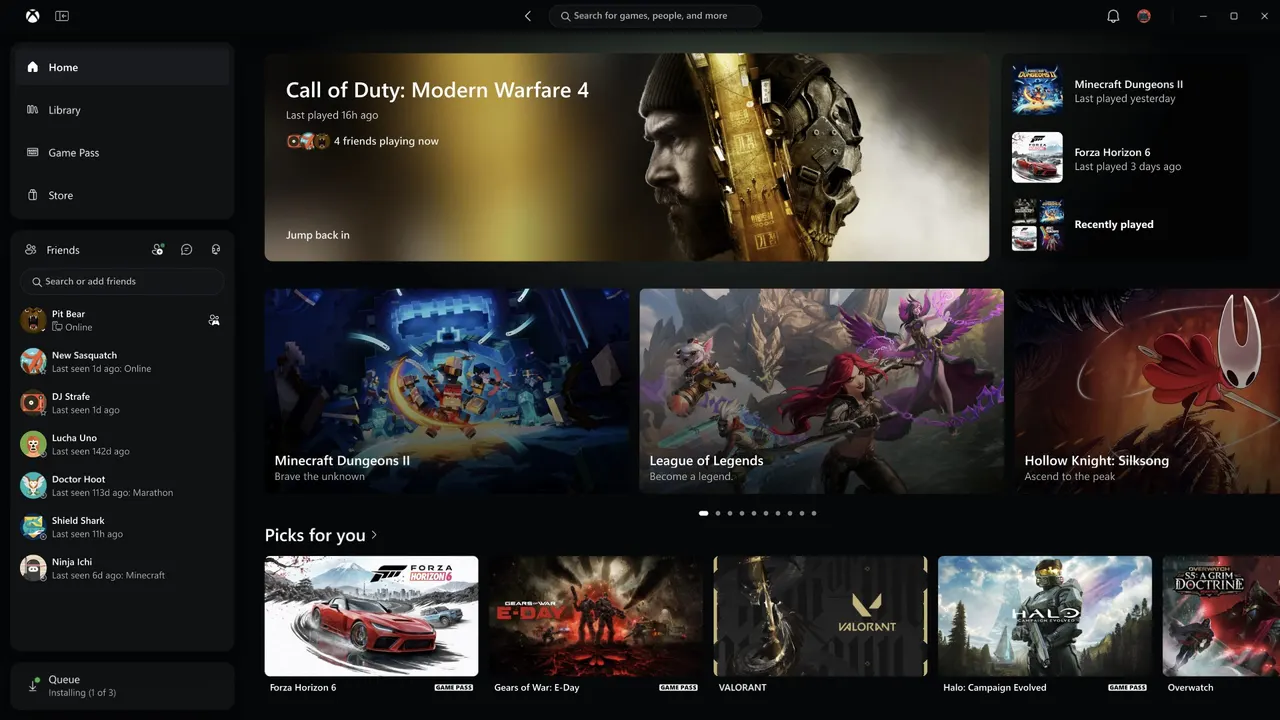
Microsoft has redesigned the Xbox app for Windows PC with a simpler layout, unified search and speed gains of up to 60%. It is limited to Xbox Insiders for now.
 SUMO· the number puzzle
 Dialo· learn languages by speaking
 ediviewer· read EDI files like documents
 giftdetect· the right gift in minutes
Microsoft has unveiled a redesign of the Xbox app for PC, the native Windows client for its gaming platform. The update brings a cleaner, easier-to-navigate interface and, more importantly for many users, noticeable performance improvements that players have been asking for.
The new look centers on better navigation of the game library, along with refined filters and tools for managing the titles you own. The app also gets a unified search that returns results for games, add-ons, people and more.
A more social approach
That people-focused search ties into a more social design. Friends are easier to reach: you can see who is online and what they are playing, or start a chat straight from the main interface. The same design will also arrive on the Xbox web version and in the cloud gaming apps for VR headsets and televisions.
Speed gains behind the scenes
The Xbox app for PC has not always made the best use of a computer's resources, and Microsoft says this update tackles that. According to the company, the new app launches up to 60% faster than the previous PC version. Windows inside the software appear up to 65% faster, while the home screen, the store and the Game Pass section load up to 50% faster.
Those figures come from Microsoft, so real-world results will need to be tested by users. For now, the redesigned app is available only to members of the Xbox Insider program. Anyone not yet enrolled will have to wait before getting access to it.
Apps worth a look
SUMO: the number puzzleTap the right tiles, add them up, hit the target. Easy to learn, hard to master. Free, for all ages.
Dialo: learn languages by speakingTalk to an AI conversation partner; every sentence comes back corrected and explained in your language. 9 languages, A1 to C2.
ediviewer: read EDI files like documentsOpen EDIFACT and X12 messages, see every segment explained, convert to JSON/XML, export PDF and Excel. Runs locally, no upload.
giftdetect: the right gift in minutesPick who it is for, the occasion and their personality. The search engine reads product descriptions from local shops and ranks what fits. Free, no sign-up.