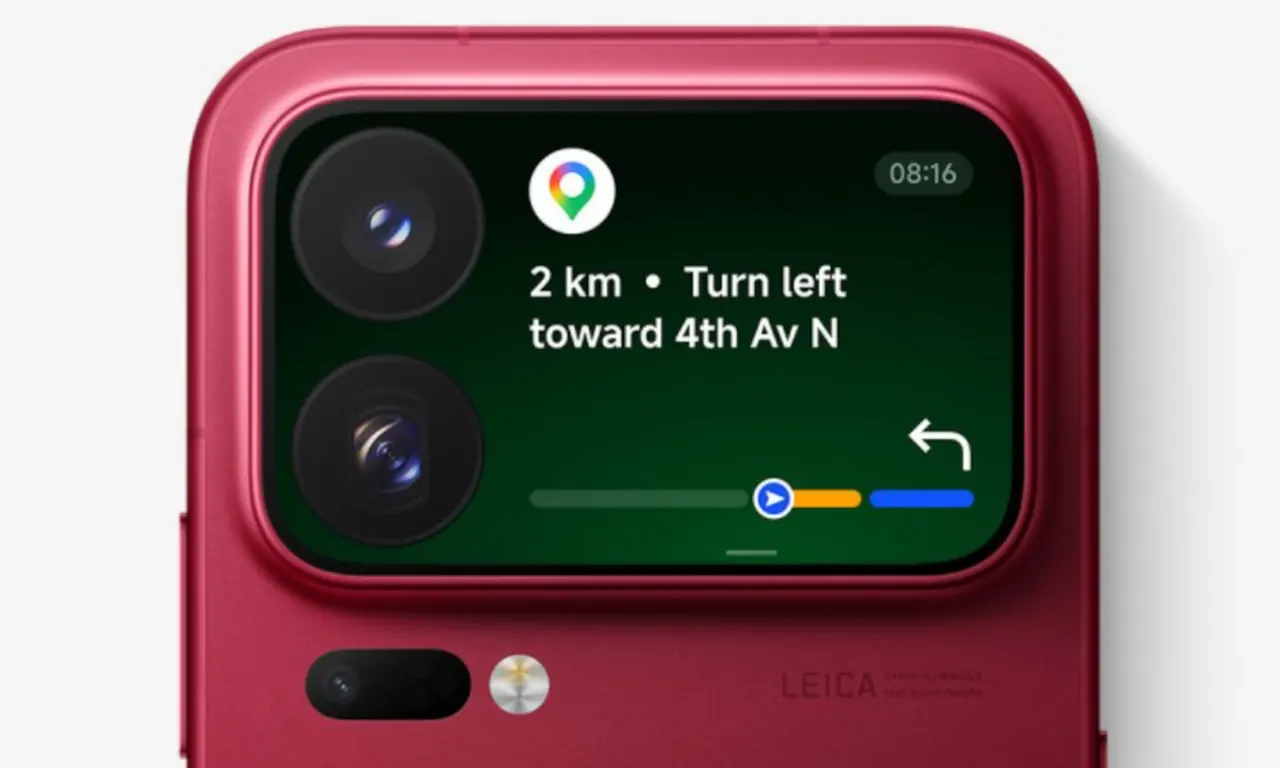
Xiaomi 18 Pro rear screen: Google Maps on the back of a phone
Xiaomi wants you to read Google Maps directions and control YouTube Music on a tiny screen on the back of the Xiaomi 18 Pro and 18 Pro Max. Not everyone is sold.
 SUMO· the number puzzle
 Dialo· learn languages by speaking
 ediviewer· read EDI files like documents
 giftdetect· the right gift in minutes
Turn-by-turn directions from Google Maps on a tiny screen on the back of your phone. That is one of the uses Xiaomi is pitching for the rear display on the Xiaomi 18 Pro and 18 Pro Max.
The two phones will be the first Xiaomi smartphones with a rear screen to be sold globally, so the company is working to convince buyers outside its home market that the idea makes sense. The obvious use is taking photos with the main camera, where the back display works as a viewfinder, particularly for selfies. It could also show notifications if you tend to leave your phone face down on the desk.
Xiaomi goes further and says the rear screen is a good place for Google Maps directions, for controlling YouTube Music or Spotify, and for other apps.
Is a rear screen on a normal phone useful?
The author of the original commentary is not convinced, and the argument is easy to follow. Why read directions on a small screen when the big one on the other side already shows the full map? Why control music there when you can do it on the main display? Lower power use might be the answer, but the front panels are OLED, which means you can light up only a small part of them without waking the whole screen.
On foldables, the argument goes, an outer screen makes sense because it lets you do things without opening the device. On a slab phone, what you gain is not having to flip it over. Beyond taking photos or videos of yourself, the critic sees no practical use.
Adding more apps does not change that, he says. It only gives you smaller, more awkward, cut-down versions of programs you can already use in full by turning the phone to face you.
Xiaomi has not given a verdict from buyers yet, and the phones are not out. For now, the pitch is on the table: your phone's back is no longer just a back.
Apps worth a look
SUMO: the number puzzleTap the right tiles, add them up, hit the target. Easy to learn, hard to master. Free, for all ages.
Dialo: learn languages by speakingTalk to an AI conversation partner; every sentence comes back corrected and explained in your language. 9 languages, A1 to C2.
ediviewer: read EDI files like documentsOpen EDIFACT and X12 messages, see every segment explained, convert to JSON/XML, export PDF and Excel. Runs locally, no upload.
giftdetect: the right gift in minutesPick who it is for, the occasion and their personality. The search engine reads product descriptions from local shops and ranks what fits. Free, no sign-up.
More from this day
See all →
Alice & Bob: RSA-2048 could fall to a 22,593-qubit quantum computer
Nvidia China chip curbs could tighten after the Jensen Huang affair
Navigo pass on Samsung: what you lose by moving to Google