Navigo pass on Samsung: what you lose by moving to Google
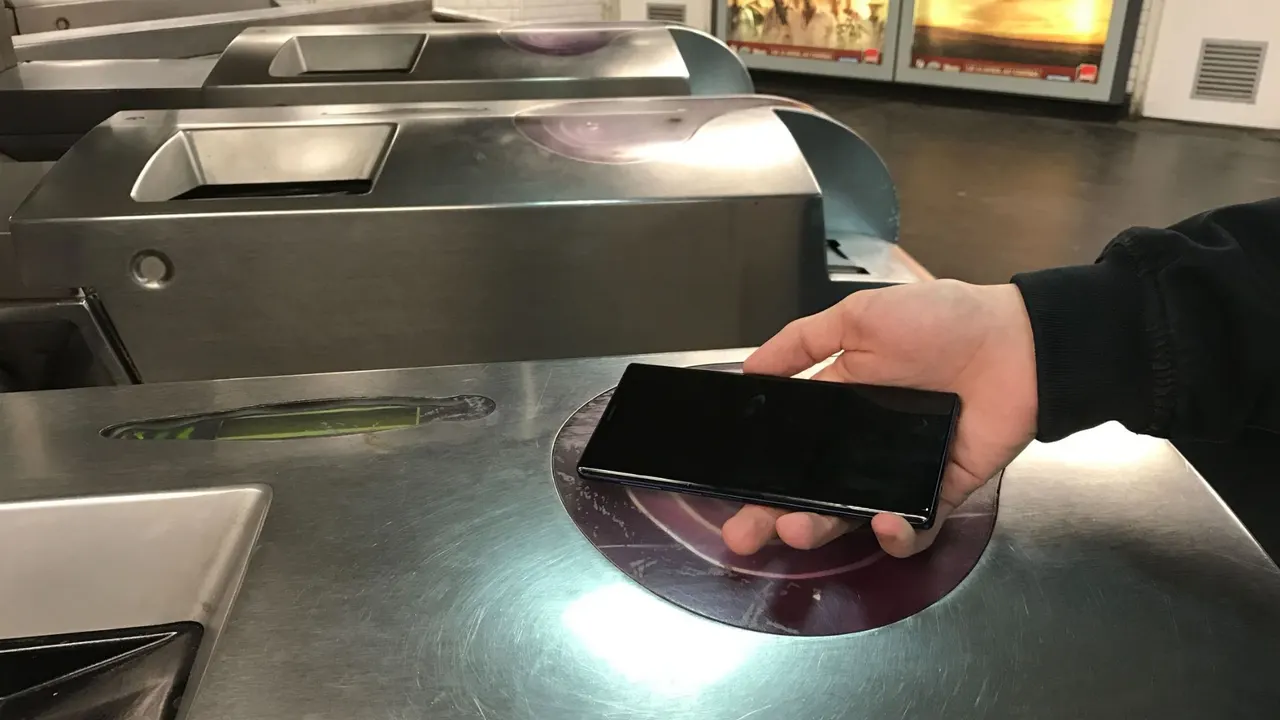
Since 13 November, Navigo on Android runs on Google's infrastructure. Samsung Galaxy owners with a secure chip lose power-off validation and Galaxy Watch support.
 SUMO· the number puzzle
 Dialo· learn languages by speaking
 ediviewer· read EDI files like documents
 giftdetect· the right gift in minutes
If you ride the Paris transport network with a Samsung Galaxy, think twice before accepting the move of your Navigo pass to Google. Since 13 November 2026, Île-de-France Mobilités (IDFM) runs the Navigo pass on Android through Google's services, and some Samsung owners come out worse off.
The reason is a technical one. Since 2019, high-end Samsung phones have stored Navigo tickets in a secure chip, the eSE (embedded Secure Element), isolated from the rest of the phone. It lets you validate with the phone switched off or with a dead battery. Google's system relies instead on HCE (Host Card Emulation), software that imitates a contactless card and needs the phone to be on.
Which Samsung phones are affected?
Only those whose tickets sit in the secure chip, usually recent or high-end models, with the pass showing up in Samsung Wallet. If your support number in the IDFM app starts with H, your tickets are in the Mes Tickets Navigo app and already work through software emulation. You lose nothing and gain the new features.
What do you lose by migrating?
First, validation with the phone off: IDFM says the chip allows up to 24 hours and 15 validations after shutdown on compatible models. Second, the Galaxy Watch: Navigo in Google Wallet does not work on watches at launch, and IDFM gives no date. Third, management in Samsung Wallet, including Samsung Pay to top up. The Apple Watch is now the only officially supported watch.
What do you gain?
Up to 20 cards per phone instead of one, though only one works in standby and the others must be triggered from an app. Tickets are backed up to your Google account when you change phones. You can buy every ticket in Google Wallet, including weekly and monthly passes with an IDFM Connect account, and pay with Google Pay in partner apps. IDFM and Samsung do not plan to bring these to the eSE chip.
How do you refuse the migration?
If the app offers the migration when you top up, you can decline. You can also use only Samsung Wallet, which sells Navigo tickets and should keep the old system for now. On a new Samsung, a Google card is installed by default, without the secure chip, but you can still create an old-style card from Samsung Wallet.
Apps worth a look
SUMO: the number puzzleTap the right tiles, add them up, hit the target. Easy to learn, hard to master. Free, for all ages.
Dialo: learn languages by speakingTalk to an AI conversation partner; every sentence comes back corrected and explained in your language. 9 languages, A1 to C2.
ediviewer: read EDI files like documentsOpen EDIFACT and X12 messages, see every segment explained, convert to JSON/XML, export PDF and Excel. Runs locally, no upload.
giftdetect: the right gift in minutesPick who it is for, the occasion and their personality. The search engine reads product descriptions from local shops and ranks what fits. Free, no sign-up.
More from this day
See all →
Nvidia China chip curbs could tighten after the Jensen Huang affair

Asteroid mining could crash platinum prices by over 75%, MIT study

Korea tax exam AI glasses cheating claim: runner-up shows his books

SS United States sunk off Florida to become a giant reef
More in: Mobile
See all →
Motorola Signature 27 may ship with a 5,500mAh battery in some markets
Pixel Private Space bug: switching dark mode unhides it
WhatsApp Status Location Sharing: A Map Post Is Coming