Razer 7.1 Surround Sound keeps writing to your SSD nonstop
A Reddit user found that Razer's 7.1 Surround Sound app for the BlackShark V3 X Hyperspeed writes to the system SSD constantly, even when idle.
 SUMO· the number puzzle
 Dialo· learn languages by speaking
 ediviewer· read EDI files like documents
 giftdetect· the right gift in minutes
If you bought a Razer BlackShark V3 X Hyperspeed headset and installed the standalone Razer 7.1 Surround Sound app, your SSD may be getting a steady workout. A Reddit user has found that the app writes data to the system drive non-stop.
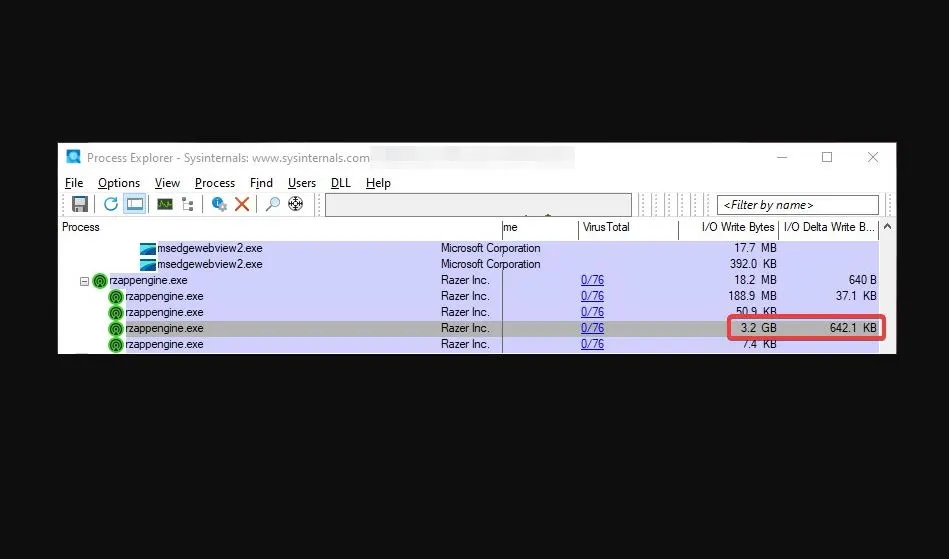
The culprit is a background process called "rzappengine.exe". The user, who posts as u/Stefouch, installed the standalone software without the full Razer Synapse 4 package. Using Sysinternals Process Explorer and the Windows Resource Monitor, they saw writes of roughly 0.6 to 1 MB/s whether or not they were logged in to the app, or whether it was just sitting idle.
"As soon as the executable starts, it begins writing continuously at about 640 KB/s," the user wrote. Play audio through it and the rate climbs to 1 MB/s and stays there until the app is restarted. A screenshot shows the process piling up 3.2 GB under I/O Write Bytes in a couple of hours. The user says it reaches 1 GB within minutes.
Why is Razer 7.1 Surround Sound writing to the SSD?
The source doesn't give an official explanation. Another commenter said heavy log writing has long been a trait of Razer's background software, and warned that simply blocking writes to the log folder makes the apps crash.
How to stop the writes
Two workarounds were mentioned. You can redirect Razer's local AppData folder to another drive, or to a virtual RAM disk, using Windows symbolic links. Or you can just stop running Razer 7.1 Surround Sound.
The timing is awkward for PC owners. Nvidia recently took heat for Game Ready drivers 621.14 and 621.24, which also wrote far too much to SSDs. Version 621.40 appears to have fixed that. A hotfix, 621.35, was followed by reports of signal loss, black screens at boot and trouble with external monitors.
Apps worth a look
SUMO: the number puzzleTap the right tiles, add them up, hit the target. Easy to learn, hard to master. Free, for all ages.
Dialo: learn languages by speakingTalk to an AI conversation partner; every sentence comes back corrected and explained in your language. 9 languages, A1 to C2.
ediviewer: read EDI files like documentsOpen EDIFACT and X12 messages, see every segment explained, convert to JSON/XML, export PDF and Excel. Runs locally, no upload.
giftdetect: the right gift in minutesPick who it is for, the occasion and their personality. The search engine reads product descriptions from local shops and ranks what fits. Free, no sign-up.
More from this day
See all →
Apple Intelligence: South Korea targets Apple over iPhone 16 ads

Anthropic denies training Claude to sabotage user work

Baltic Sea cyanobacteria blooms may affect cloud formation

Fiber optic cable earthquake sensor maps New Zealand's Alpine Fault
More in: Software
See all →
Claude Desktop freezes on Linux: a 27-byte reply is the cause

Jellyfin and Plasma Bigscreen: build your own streaming setup

YouTube Ad Punisher reloads the page to dodge ads