Mac Calculator design: how Steve Jobs built it himself in 10 minutes
Steve Jobs kept rejecting the first Mac calculator. So a young engineer gave him a toolkit, and Jobs designed the thing himself in about ten minutes.
 SUMO· the number puzzle
 Dialo· learn languages by speaking
 ediviewer· read EDI files like documents
 giftdetect· the right gift in minutes
Every boss has a version of this moment: you hand in the work, they frown, and they can't say what is wrong. In 1982, Apple engineer Chris Espinosa found an unusual way out. He let Steve Jobs design the original Mac calculator himself.
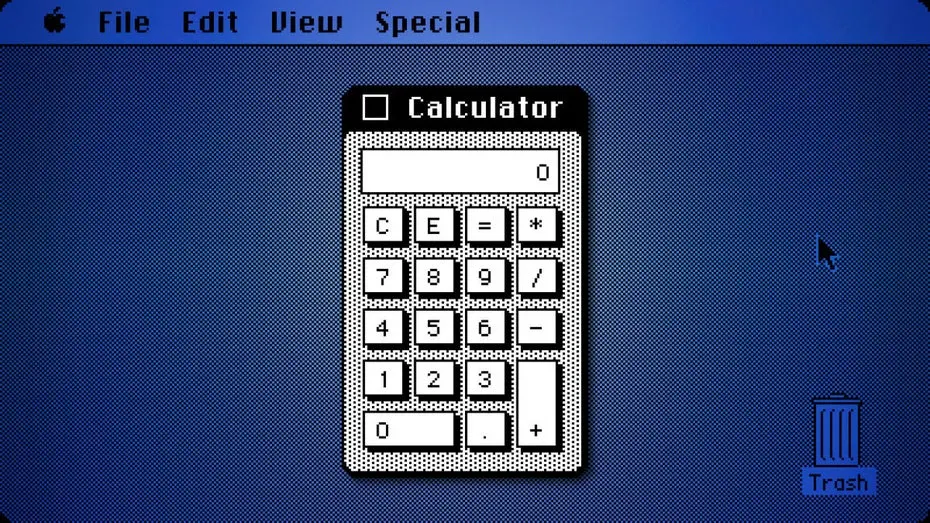
Espinosa was on the team building the first Macintosh and handled the technical documentation. Along the way he wrote a program using QuickDraw, Apple's graphics routines, that let him put together user interfaces. He used it to mock up the calculator.
According to former Apple developer Andy Hertzfeld, who tells the story on his Folklore blog about the Macintosh's early days, Jobs was not impressed. Hertzfeld calls him Apple's "aesthetic compass". Jobs reportedly said: "Well, it's a start. But basically it's lousy." The background was too dark, the buttons too big and some lines had the wrong thickness.
The "Steve Jobs Roll Your Own Calculator Construction Set"
Espinosa worked the feedback into later versions, but Jobs was never satisfied. So Espinosa changed tactics. He built something he called the "Steve Jobs Roll Your Own Calculator Construction Set".
It put the calculator's visual properties into pull-down menus. Line thickness, button size and more could be adjusted by the boss himself. Hertzfeld says Jobs played with it for ten minutes, until he landed on a look he liked.
Did Jobs' design make it into the Mac?
Yes. His version became the actual design of the calculator when the first Macintosh launched in 1984. It stayed that way until 2001, when OS X gave it a makeover.
It's a neat bit of workplace psychology. When someone knows what they dislike but can't describe what they want, sometimes the fastest fix is to hand them the controls.
Apps worth a look
SUMO: the number puzzleTap the right tiles, add them up, hit the target. Easy to learn, hard to master. Free, for all ages.
Dialo: learn languages by speakingTalk to an AI conversation partner; every sentence comes back corrected and explained in your language. 9 languages, A1 to C2.
ediviewer: read EDI files like documentsOpen EDIFACT and X12 messages, see every segment explained, convert to JSON/XML, export PDF and Excel. Runs locally, no upload.
giftdetect: the right gift in minutesPick who it is for, the occasion and their personality. The search engine reads product descriptions from local shops and ranks what fits. Free, no sign-up.
More from this day
See all →
Hawking stars: atom-sized black holes could blow stars apart

Quam: Germany's first virtual mobile carrier and its failure

Samay Raina is first YouTuber to pass 1 million paid memberships

WhatsApp Web safety: India warns about forgotten sessions
More in: Software
See all →
Google may delete inactive accounts after two years, even without a plan
Quick Commander 4.00 for ZX Spectrum ships 20 years after its announcement
Build iOS and macOS apps on Windows without a Mac, using WSL2