iPhone Duo lock screen has a hidden widget column, switched off
Apple built and tested a column of two extra lock screen widgets for the iPhone Duo, then left it disabled in iOS 27.1. Only an internal flag stands in the way.
 SUMO· the number puzzle
 Dialo· learn languages by speaking
 ediviewer· read EDI files like documents
 giftdetect· the right gift in minutes
The iPhone Duo's lock screen may have room for more widgets than Apple lets you use. The code for a second set is already there, and it is switched off.
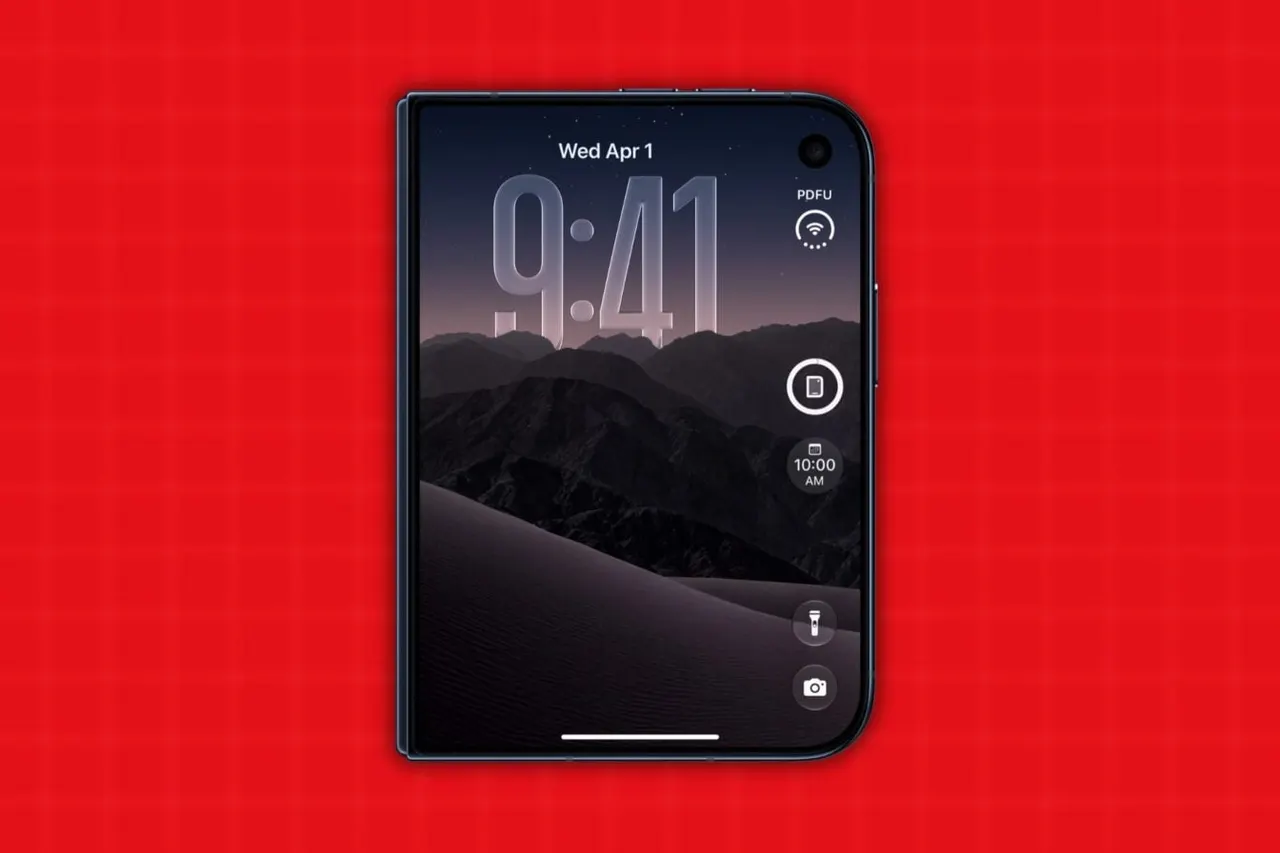
The leaker pdfu found a feature in iOS 27.1 called "complication column", designed for the foldable's lock screen. It would line up two circular widgets along the right edge, on top of the row that already sits at the bottom. Apple tested it, then disabled it. Nothing says whether it will come back.
What is the iPhone Duo's complication column?
The column sits on the right edge of the lock screen, above the flashlight and camera shortcuts and below the Wi-Fi and cellular indicators. Its two widgets are the same size as the ones at the bottom, and according to the leak both areas could show at once. Today the lock screen has the time at the top, a row of widgets along the bottom edge and two controls in the lower right corner. Those controls already accept shortcuts other than the flashlight and camera.
The internal flag, labelled "SpringBoard/Ionic", remains off. The code hasn't changed since it first appeared in iOS 27.1, the version that shipped with the phone and was updated for it alone in late October. It could be work in progress or an abandoned idea. The same leaker pulled five hidden clock faces for the foldable's StandBy mode out of the code in late September, including a Snoopy.
Why "complication"?
The word comes from watchmaking, where it means anything a dial shows besides the time. The Apple Watch made it familiar: weather, activity rings or your next appointment at a glance. Lock screen widgets, which arrived on iPhone with iOS 16 in 2022, descend straight from them, and developers build them with the same tool as watch faces. The iPad has put them in a side column since iPadOS 17 in 2023.
The leak doesn't say whether the column targets the 5.4-inch outer screen, the 7.6-inch inner display or both. The big screen, mostly empty once unfolded, is the obvious fit. Weather, battery level or upcoming calendar events would stay in view without unlocking anything.
Apple has been tweaking the foldable with updates since its 23 October release. The second beta of iOS 27.3 just added Face unlock through the outer screen's camera and automatic locking when the phone folds, two features people missed at launch. At 2,339 euros, a dormant feature that needs just one setting flipped is worth noticing.
Apps worth a look
SUMO: the number puzzleTap the right tiles, add them up, hit the target. Easy to learn, hard to master. Free, for all ages.
Dialo: learn languages by speakingTalk to an AI conversation partner; every sentence comes back corrected and explained in your language. 9 languages, A1 to C2.
ediviewer: read EDI files like documentsOpen EDIFACT and X12 messages, see every segment explained, convert to JSON/XML, export PDF and Excel. Runs locally, no upload.
giftdetect: the right gift in minutesPick who it is for, the occasion and their personality. The search engine reads product descriptions from local shops and ranks what fits. Free, no sign-up.
More from this day
See all →
RAF plans uncrewed AI fighter jets in British skies next year

Tesla Model Y without steering wheel or pedals is coming, Musk says

Google AI Mode Personal Intelligence now reads Drive and Wallet

Microsoft 365 outage report: a July bug and lost emails
More in: Mobile
See all →
iOS 27 alarm volume: iPhone alarms finally get their own slider
YouTube custom app icons: the retro iPhone TV may be coming back

Samsung Photo Stitching in One UI 9.5 joins photos uncropped