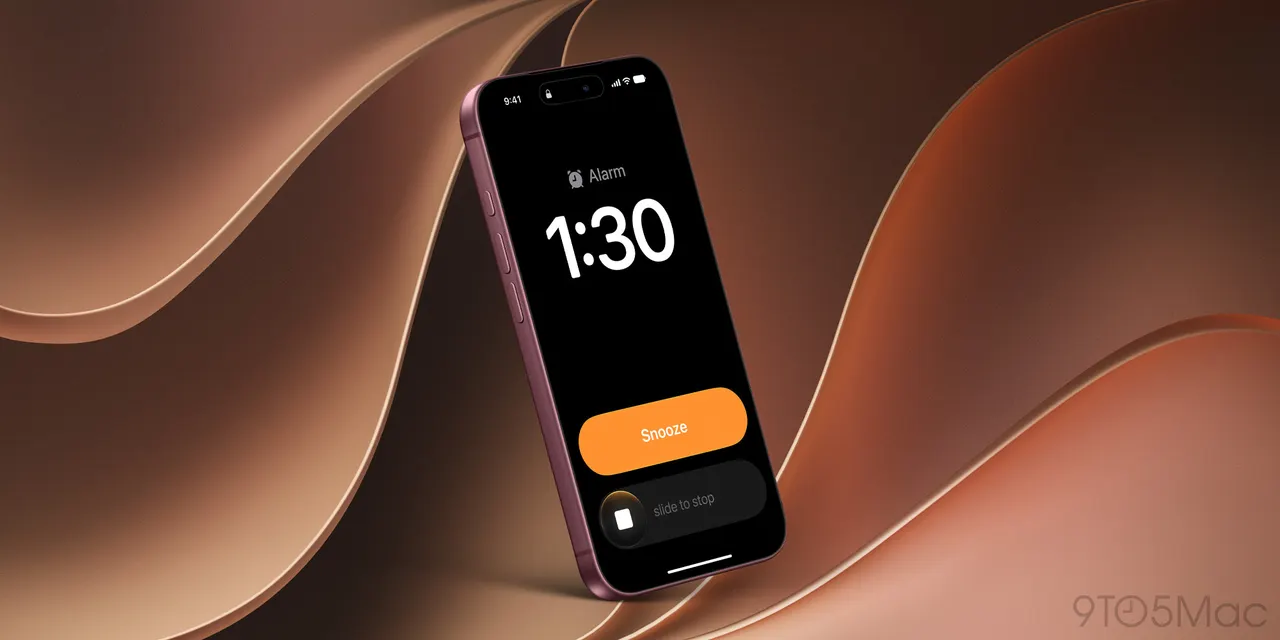
iOS 27 alarm volume: iPhone alarms finally get their own slider
iOS 27 lets you set the iPhone alarm volume separately from the ringtone, so a quiet ringer no longer means a quiet wake-up call.
 SUMO· the number puzzle
 Dialo· learn languages by speaking
 ediviewer· read EDI files like documents
 giftdetect· the right gift in minutes
Sleeping through an alarm because the volume was turned down by accident is a very human failure. In iOS 27, Apple has a fix: the iPhone alarm volume can now be set on its own, separate from everything else.
The catch is that it is not on by default. You have to switch it on yourself.
How to change the alarm volume in iOS 27
The new controls live in Settings, under Sounds & Haptics. iOS 27 adds two sections there: Alarms and Timers, and Alerts and System Sounds. Each has a toggle called Match Ringtone Volume, and both are on out of the box. That means alarms, timers, alerts and other system sounds all follow the ringtone volume, as they did before.
Turn off the toggle under Alarms and Timers and a new volume slider appears. It controls only alarms and timers, and moving the ringtone volume no longer affects it.
Why it matters
The practical upshot is that you can push the alarm volume to the maximum without making everything else loud. Notifications and phone calls stay at whatever level you chose for the ringtone, so you won't get blasted by a text at the cinema just because you want to be sure of waking up at 6:30.
The writer of the original report says a low alarm volume, set by accident, is probably a common reason for missed alarms. That is a reasonable guess, and this setting addresses it directly.
This builds on recent alarm changes. iOS 26 added custom snooze durations and an option to have alarms sound on the iPhone even when you are wearing an Apple Watch.
Because the match toggles are on by default, nothing changes until you open Settings and flip the switch. If you rely on your phone to get you out of bed, it is a one-minute job.
Apps worth a look
SUMO: the number puzzleTap the right tiles, add them up, hit the target. Easy to learn, hard to master. Free, for all ages.
Dialo: learn languages by speakingTalk to an AI conversation partner; every sentence comes back corrected and explained in your language. 9 languages, A1 to C2.
ediviewer: read EDI files like documentsOpen EDIFACT and X12 messages, see every segment explained, convert to JSON/XML, export PDF and Excel. Runs locally, no upload.
giftdetect: the right gift in minutesPick who it is for, the occasion and their personality. The search engine reads product descriptions from local shops and ranks what fits. Free, no sign-up.
More from this day
See all →
Google AI Mode Personal Intelligence now reads Drive and Wallet

Microsoft 365 outage report: a July bug and lost emails

Banks tighten AI agent rules after OpenAI test agents broke out

DOJ targets $1.17 billion in USDC tied to the Binance hack
More in: Mobile
See all →
YouTube custom app icons: the retro iPhone TV may be coming back
Samsung Photo Stitching in One UI 9.5 joins photos uncropped

Denmark smartphone ban in schools: no phones up to 10th grade