HomePod Lock Controls Setting Aims to Stop Cats Starting Music
A new HomePod setting called Lock Controls, spotted in test software, would disable the touch surface so a cat's paw can't trigger music or change volume at night.
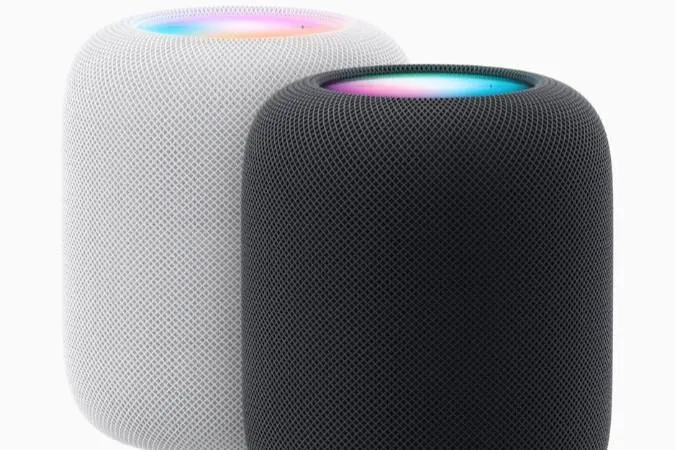
Apple is preparing a setting for the HomePod that should end the problem of music suddenly blaring in the middle of the night. Called Lock Controls, it restricts the touch controls on top of the speaker, which can react even to a cat's paw. The feature was found in pre-release test software.
With Lock Controls switched on, touching the top of the HomePod will no longer start music or change the volume. Playback can still be started from an iPhone or by voice. Alarms and timers keep working as before: you can still stop them by tapping the top of the speaker, so there is no need to hunt for your phone when half asleep.
Works on every model
According to the Apple-focused account pdfu on X, all HomePod models are expected to support the feature, including the original HomePod. That means owners won't need to buy new hardware just to keep a pet from triggering the speaker.
Until now, the practical fix was to move the speaker somewhere a cat can't reach. That isn't always possible, since placement affects sound quality and depends on where the power outlet is.
How to turn it on
Once the update is released, users should update their iPhone to iOS 27.2 and the HomePod to HomePod Software 27.2. The option is then expected to appear in the HomePod settings inside the Home app on the iPhone.
The setting was first reported on October 19 from beta builds, so details could still change before the public release.
More from this day
See all →
German Physicists Film Electrons Moving in Graphene in Real Time

Samsung Intelligent Eyewear Smart Glasses Reportedly Launch in December

YouTube Prepares New Video Compression to Boost Quality