Google Messages Adds Enhanced Protection to Fight Text Scams
Google Messages is rolling out an optional Enhanced Protection mode that uses Gemini to catch slow-burn scams and check suspicious links on Android.
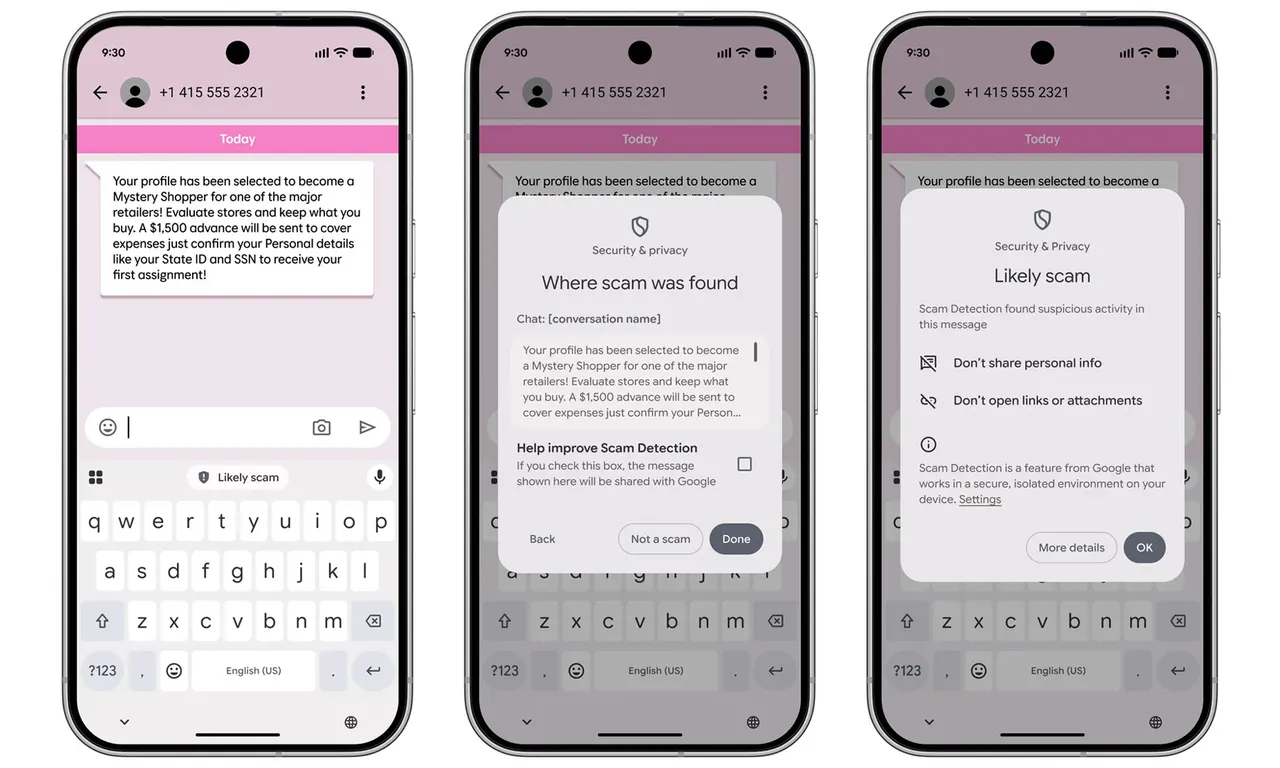
Google has started rolling out Enhanced Protection for Google Messages, an optional mode that uses more powerful AI to catch text scams before they do damage. The company announced the feature earlier this month, and it is now reaching Android users gradually.
Spotting scams that start innocently
Google Messages already filters spam and scams, but Enhanced Protection goes further. It uses Google's cloud-based Gemini models to analyze conversations with people who are not in your contacts. That matters because many scammers open with harmless small talk, posing as a delivery agent or a bank representative, and only later ask for money or personal details. Google says the upgraded detection is designed to recognize those patterns earlier, even when the message does not follow an obvious script.
Analyzing private chats naturally raises privacy questions. According to Google, the feature relies on its Private AI Compute technology, which encrypts message data and processes it in an isolated environment that even Google cannot access.
Smarter link checks and new warnings
A second layer targets suspicious websites. On supported devices, the on-device Gemini Nano model works together with live web information to assess unfamiliar links, which could catch dangerous sites that are not yet on existing blocklists. Google is also adding clearer warnings when someone outside your contacts sends a link, giving you a moment to reconsider before tapping.
The link-checking part currently supports the Pixel 10 series and newer, Samsung's Galaxy S26 lineup, the Galaxy Z Flip 8, the Galaxy Z Fold 8 and certain other devices.
How to turn it on
Standard Protection remains the default, so you need to opt in. In Google Messages, tap your profile picture, open Messages settings, then Protection & safety, and choose Spam & scam protection. You can pick Enhanced Protection, Standard Protection or No Protection.
Availability is still limited. The feature has begun appearing in Google Messages beta version 20261020_00_RC00, and the rollout will take time, so the option may not show up on every phone yet.
More from this day
See all →
Instacart Reportedly Explored a Sale in Talks With DoorDash, Uber

OKXICE Tokenized Stock Plan Draws 22 Objections as Cisco, Wells Fargo Opt Out

Argentine Judge Clears Milei and 10 Others in LIBRA Token Case