Claude in Chrome keeps asking permission: the hidden site list
A user found Claude in Chrome asks for approval on every click on some sites. The extension checks a server-side Anthropic list that isn't published.
 SUMO· the number puzzle
 Dialo· learn languages by speaking
 ediviewer· read EDI files like documents
 giftdetect· the right gift in minutes
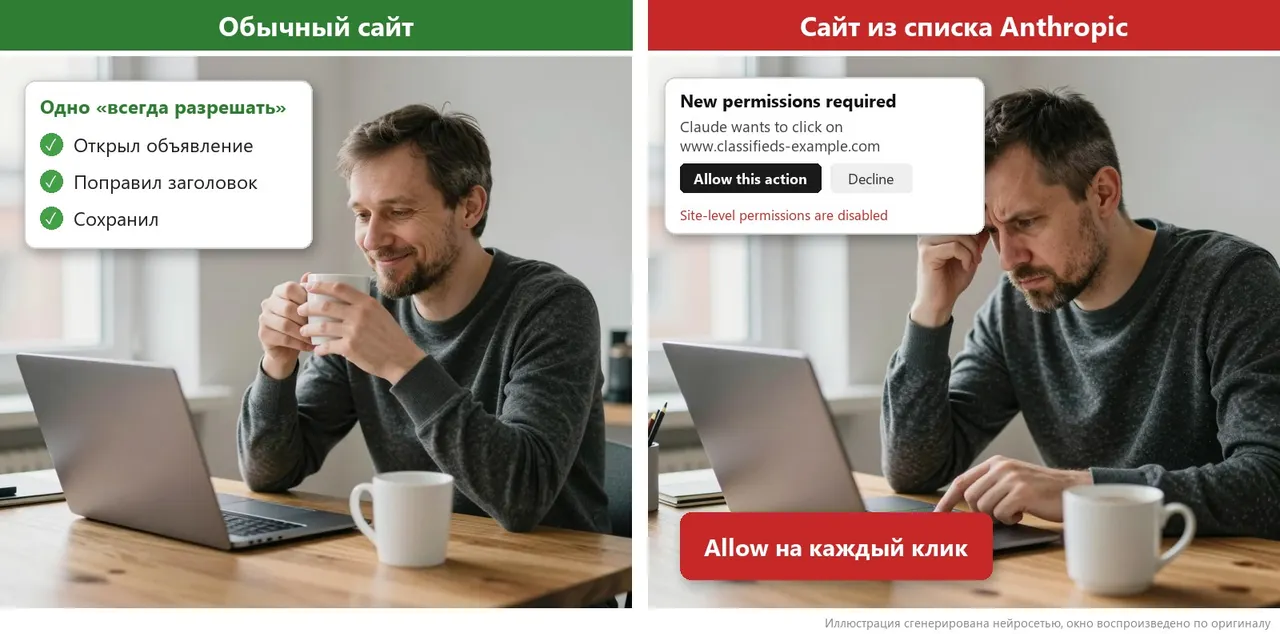
A user editing his own listings with Claude in Chrome noticed something odd. On one website the assistant worked after a single "always allow". On a similar site it demanded confirmation for every click, and there was no "always allow" button at all. Digging into the extension's code, he found why: Anthropic keeps a closed list of sites.
Claude in Chrome is Anthropic's extension that opens pages, reads them and clicks around while logged in as you. On the problem site, the page opened and the text was read, but clicking "Edit" brought up a prompt. The window even said "Site-level permissions are disabled for this site". Switching between the panel's three confirmation modes changed nothing.
Anthropic's help pages do say some sites trigger a question before every action. According to the documentation for organisations, the extension checks addresses against a "site safety list". How a site lands on it isn't described, and the list isn't public. The security page only hints that adult and pirate sites are blocked and financial ones prompt questions.
How does the Claude in Chrome site check work?
The extension code (version 1.0.102) sends the page address to an Anthropic server before acting. The server returns a category. Category0 allows "always allow", category1 shows a blocked page, and category3 asks on every click. The answer is cached for five minutes, and the category applies to the whole domain, not a single page. The list itself isn't stored on your computer.
The only documented workaround is a trusted-sites list in organisation settings, available on Team and Enterprise plans. Personal accounts don't have it, and there is no described way to ask for a site's removal. Auto mode in Claude Code should skip the check according to the docs, but in the author's one test the click still hit the prompt.
How to see your site's category
Open chrome://extensions, turn on Developer mode, click "service worker" on the Claude card, go to the Network tab and filter for url_hash. Open the browser_extension row and read the category field in Response. Don't share screenshots of Headers, since they show your login token.
Anthropic names prompt injection as the main risk: hidden instructions on a page that the model mistakes for your commands. The caution makes sense. But with no published criteria and no notice, you only find out when you hit the wall. The author keeps a public GitHub registry of checked sites and says similar complaints appear in Claude Code issues.
Apps worth a look
SUMO: the number puzzleTap the right tiles, add them up, hit the target. Easy to learn, hard to master. Free, for all ages.
Dialo: learn languages by speakingTalk to an AI conversation partner; every sentence comes back corrected and explained in your language. 9 languages, A1 to C2.
ediviewer: read EDI files like documentsOpen EDIFACT and X12 messages, see every segment explained, convert to JSON/XML, export PDF and Excel. Runs locally, no upload.
giftdetect: the right gift in minutesPick who it is for, the occasion and their personality. The search engine reads product descriptions from local shops and ranks what fits. Free, no sign-up.
More from this day
See all →
Can you still refuse a Linky meter? What the EU ruling means

New peanut worm species found in Japan's deep sea has saw-toothed hooks

TikTok's For You feed breaks EU rules, Commission says