TikTok parental controls now show parents what teens watch
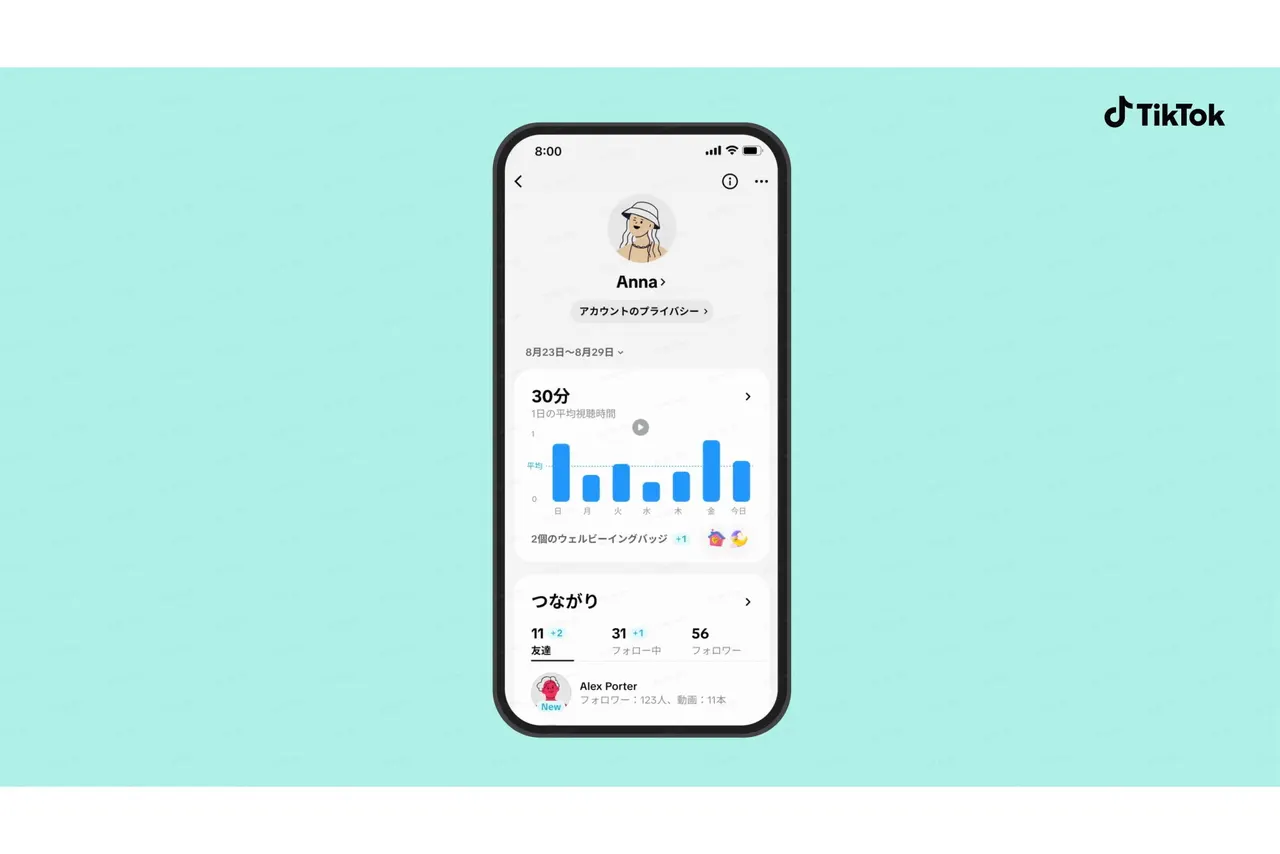
TikTok's redesigned parental controls let parents see some of the content from verified creators their teen follows, and now work in any web browser, PC included.
 SUMO· the number puzzle
 Dialo· learn languages by speaking
 ediviewer· read EDI files like documents
 giftdetect· the right gift in minutes
Parents who want to know what their teenager actually watches on TikTok just got a bit more to go on. The app has overhauled its parental controls, and one new view lets parents see part of the content from verified creators their teen follows.
According to TikTok, that feature is the one parents asked about most. It is meant as a clue to what kind of content a teen is exposed to, not a full replay of their feed. The controls can also now be opened from any web browser, including on a PC, not just inside the app.
What the new TikTok parental controls show
Accounts for teens already come with privacy and security settings suited to their age. The redesign makes the information parents care about easier to find. Screen time, meaning how long the teen uses the app, now appears first among the insights.
Parents can also see changes in follower and following counts, plus the accounts their teen is connected to and the ones they have blocked. In the coming months, they will be able to see who their teen exchanges messages with. A weekly view shows what the teen posted and how many views it got.
TikTok says the aim is to give parents information they can act on, with enough context to start a conversation at home. It also says it wants to respect teens' privacy, so both sides feel comfortable with the tool.
What else is coming
TikTok is working on an alert that would notify parents if their teen repeatedly searches for known terms linked to self-harm. Expert-informed guidance is planned to go with it. The company has not given a date for the alert.
For schools, TikTok has published an Educator's Guide, a page built with teachers and specialists that gathers information, tools and advice for school communities. More classroom resources are due in the next few weeks.
Apps worth a look
SUMO: the number puzzleTap the right tiles, add them up, hit the target. Easy to learn, hard to master. Free, for all ages.
Dialo: learn languages by speakingTalk to an AI conversation partner; every sentence comes back corrected and explained in your language. 9 languages, A1 to C2.
ediviewer: read EDI files like documentsOpen EDIFACT and X12 messages, see every segment explained, convert to JSON/XML, export PDF and Excel. Runs locally, no upload.
giftdetect: the right gift in minutesPick who it is for, the occasion and their personality. The search engine reads product descriptions from local shops and ranks what fits. Free, no sign-up.
More from this day
See all →


More in: Software
See all →
Microsoft Outlook outage: some emails were lost for good

Chrome using RAM after you close it? Gemini may be why

Google's new search page swaps the search button for an AI button