Moonlock for iPhone checks texts and QR codes for scams
MacPaw's Moonlock now runs on iPhone. It can't scan for malware, but it can tell you whether that odd text, screenshot or QR code looks like a scam.
 SUMO· the number puzzle
 Dialo· learn languages by speaking
 ediviewer· read EDI files like documents
 giftdetect· the right gift in minutes
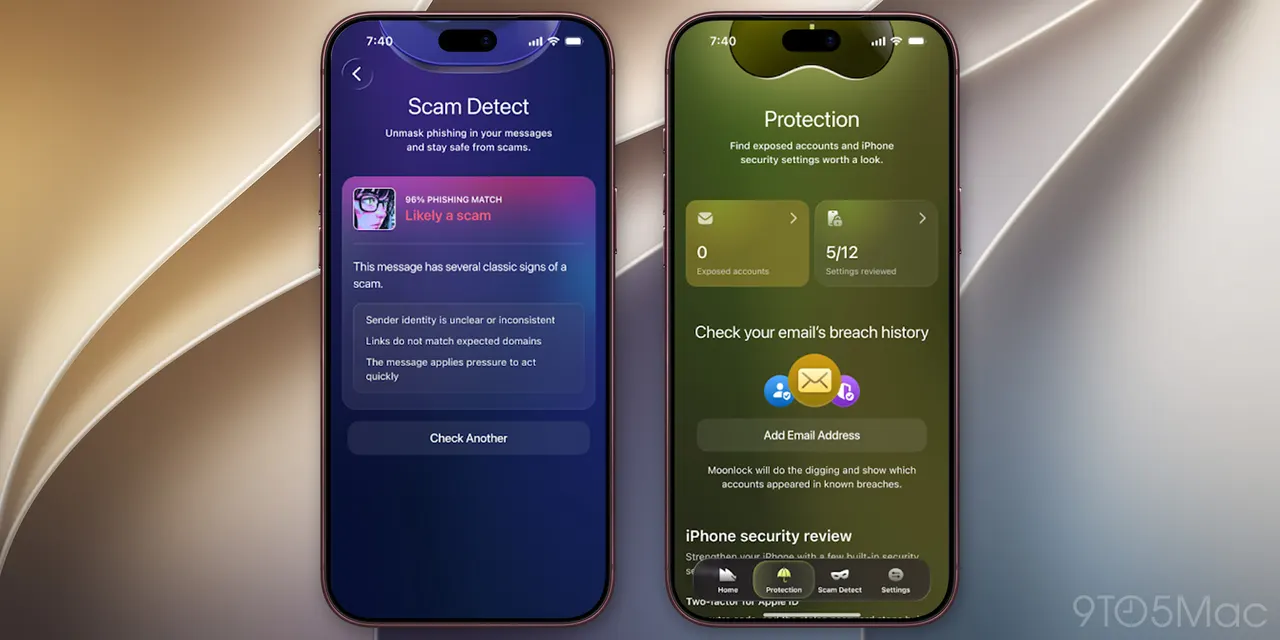
Got a text from a "delivery company" you've never heard of? Moonlock for iPhone, launched today by MacPaw, is built for exactly that moment. You paste in the message, scan a QR code or share a screenshot, and the app explains why it might be a scam.
Moonlock arrived on the Mac last year, where it works as a malware scanner with a VPN, a network inspector and an AI-powered phishing checker. The iPhone version is a different animal. It doesn't scan for malware at all, because iOS doesn't let third-party apps look at other apps and their files. So MacPaw built it around scams and basic security hygiene instead.
What does Moonlock for iPhone do?
The main feature is Scam Detect, which assesses suspicious texts, screenshots and QR codes and gives a reason for its verdict. Safe SMS goes a step further: when switched on, it filters suspected scam texts out of your inbox and keeps a record of what it caught and why.
There is also a Security Score from 0 to 100 that reflects how your iPhone is set up, with one recommended action at a time. Email Breach History tells you whether your address appeared in a known data breach, which service leaked it, when, and what was exposed, then walks you through securing each affected account.
Device and Network Checks look at Wi-Fi safety, passcode protection, iOS updates and signs of jailbreaking. They produce a checklist of one-time fixes, each with step-by-step instructions and an estimate of how long it takes.
How much does Moonlock for iPhone cost?
The app is free to download. Subscriptions cost $9.99 per month or $49.99 per year.
Oleg Stukalenko, Head of Product Management at Moonlock, said much of what people do now, from banking to everyday conversations, happens on their phones, and the goal is to help people spot a scam before they tap.
Apps worth a look
SUMO: the number puzzleTap the right tiles, add them up, hit the target. Easy to learn, hard to master. Free, for all ages.
Dialo: learn languages by speakingTalk to an AI conversation partner; every sentence comes back corrected and explained in your language. 9 languages, A1 to C2.
ediviewer: read EDI files like documentsOpen EDIFACT and X12 messages, see every segment explained, convert to JSON/XML, export PDF and Excel. Runs locally, no upload.
giftdetect: the right gift in minutesPick who it is for, the occasion and their personality. The search engine reads product descriptions from local shops and ranks what fits. Free, no sign-up.
More from this day
See all →
Strange lights over Warsaw: MITHRAS 1000 flare tests explained
Allegro fined nearly 55 million zloty by UOKiK over eco claims

Tesla Cybercab costs $29,900, plus $299 a month to drive

MyMems: Will Wright's AI game turns your memories into a world
More in: Mobile
See all →
How to save mobile data on Android and iPhone: 8 settings
Samsung One UI 9.5 adds native app lock for Galaxy phones

Disney+ and Hulu merge into one app in December, after 3 years