Microsoft To Do shuts down June 2027, with no Planner for home users
Microsoft To Do, the app built by the old Wunderlist team, ends on 30 June 2027. Work and school users get Planner. People on personal accounts get nothing.
 SUMO· the number puzzle
 Dialo· learn languages by speaking
 ediviewer· read EDI files like documents
 giftdetect· the right gift in minutes
Microsoft To Do is going away. The company said on 18 November, on an official support page, that every version of the app will stop on 30 June 2027. That covers the web, Windows, Mac, iOS and Android apps, for work and school accounts as well as personal Microsoft accounts.
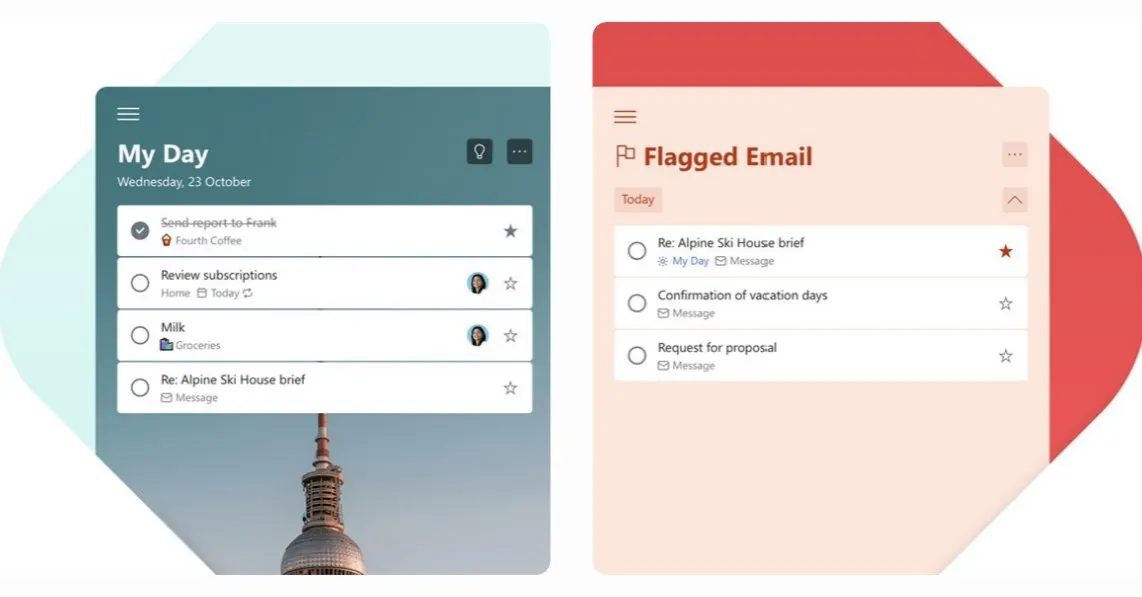
To Do was built by the team behind Wunderlist, the task app Microsoft bought in 2015, and launched in 2017. It offers a "My Day" list for what you plan to do today, separate lists, due dates and reminders. Tasks are stored in Exchange Online, which is why they also show up in Outlook.
What replaces Microsoft To Do?
For work and school accounts, Microsoft points to Microsoft Planner. Personal tasks would sit in Planner next to assigned work tasks. A reworked "My Tasks" feature in Planner is due to roll out from December 2026.
Personal accounts are a different story. That includes Microsoft 365 Personal and Family subscribers. They cannot use Planner at all, and Microsoft simply tells them to decide which tasks and lists they want to keep and pick another task app.
What happens to my tasks?
Nothing moves on its own. Existing tasks stay viewable and manageable in Planner until 30 June 2027, then access ends. Microsoft says it will provide a way to export To Do data before the shutdown, but has not said how. It also warns that an export may not be importable into Planner or other apps.
Planner is not a drop-in copy. There are no native Windows or Mac apps planned, shared list members and permissions don't carry over, and syncing with Outlook categories isn't supported. The backend service, API and sync for To Do will end on a separate schedule, with dates still to come.
The classic Outlook Tasks feature is a different thing and stays available.
Apps worth a look
SUMO: the number puzzleTap the right tiles, add them up, hit the target. Easy to learn, hard to master. Free, for all ages.
Dialo: learn languages by speakingTalk to an AI conversation partner; every sentence comes back corrected and explained in your language. 9 languages, A1 to C2.
ediviewer: read EDI files like documentsOpen EDIFACT and X12 messages, see every segment explained, convert to JSON/XML, export PDF and Excel. Runs locally, no upload.
giftdetect: the right gift in minutesPick who it is for, the occasion and their personality. The search engine reads product descriptions from local shops and ranks what fits. Free, no sign-up.
More from this day
See all →
South Korea's Suneung exam alert caught 49 students with phones

Kh-101 missiles found at three crash sites in Poland, prosecutors say
mBank warns of card scams after the Autopay data leak