HomePod Sound Glow: how to turn on the new light show
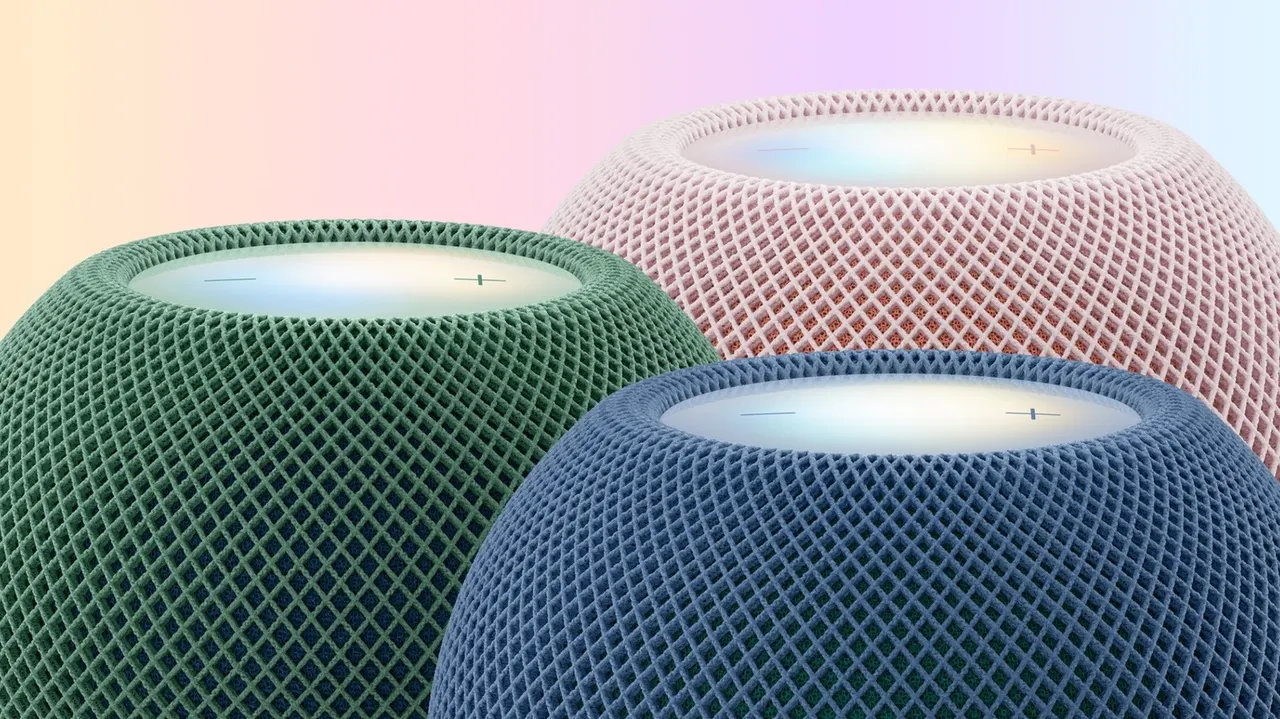
Sound Glow turns the top of your HomePod into a light show that borrows colors from the album art. Here is which speakers get it and where the toggle is.
 SUMO· the number puzzle
 Dialo· learn languages by speaking
 ediviewer· read EDI files like documents
 giftdetect· the right gift in minutes
The light on top of a HomePod has always been a bit boring. It glows when Siri is listening and when something is playing, and that is about it. Sound Glow changes that: the speaker now pulls colors from the album art and pulses them to the beat. Apple added it in HomePod Software 27.2, shortly after the HomePod mini 2 launched.
The colors follow the music. Taylor Swift's The Life of a Showgirl gives you mostly green and orange, while Miley Cyrus's Endless Summer Vacation turns the speaker blue. Apple says the animation reacts in real time to bass and treble, so two songs from the same album will not glow the same way. It also works with podcasts and Apple's ambient sounds. The Rain soundscape, for example, gets a gentle pitter-patter effect.
Which HomePods support Sound Glow?
The original HomePod mini, the HomePod mini 2 and the larger HomePod 2 all get it. The 2018 HomePod does not, even though it can install the latest software. You also need an Apple Intelligence device paired with your speakers: an iPhone 15 Pro or newer, an M1 Mac or newer, or one of the latest iPads. An Apple TV running tvOS 27 works too.
How do you turn on Sound Glow on a HomePod?
- Update everything first. In the Home app on another Apple device, tap the three-dot button, choose Home Settings, then Software Update. You need HomePod Software 27.2 or later, and iOS 27.2 on your iPhone or iPad. A brand-new HomePod mini 2 may ship with an older version.
- Go back to the main screen of the Home app and tap your HomePod.
- Open Settings and scroll down to the Sound Glow toggle.
- Flip it on. You have to do this for each HomePod separately.
- Ask Siri to play a song, or use AirPlay from your iPhone, to check that it works.
To turn it off, follow the same steps and flip the toggle back.
Don't expect it to light up your living room. The LEDs are only bright enough to notice in a completely dark room. Songs without artwork, and videos, fall back to the standard white light.
Apps worth a look
SUMO: the number puzzleTap the right tiles, add them up, hit the target. Easy to learn, hard to master. Free, for all ages.
Dialo: learn languages by speakingTalk to an AI conversation partner; every sentence comes back corrected and explained in your language. 9 languages, A1 to C2.
ediviewer: read EDI files like documentsOpen EDIFACT and X12 messages, see every segment explained, convert to JSON/XML, export PDF and Excel. Runs locally, no upload.
giftdetect: the right gift in minutesPick who it is for, the occasion and their personality. The search engine reads product descriptions from local shops and ranks what fits. Free, no sign-up.
More from this day
See all →
Mars 'potato chip' rocks and ghostly white stones found by NASA rovers

NASA Perseverance rover and Mars Odyssey both paused by faults
Pixel Weather now lets you report wrong local conditions
GrapheneOS RCS app works without Google Messages, with a catch
More in: Hardware
See all →