Firefox 161 adds per-site VPN rules and a Fire button
Firefox 161 lets you decide which sites always use its built-in VPN, and adds a toolbar Fire button that wipes your browsing data in one click.
 SUMO· the number puzzle
 Dialo· learn languages by speaking
 ediviewer· read EDI files like documents
 giftdetect· the right gift in minutes
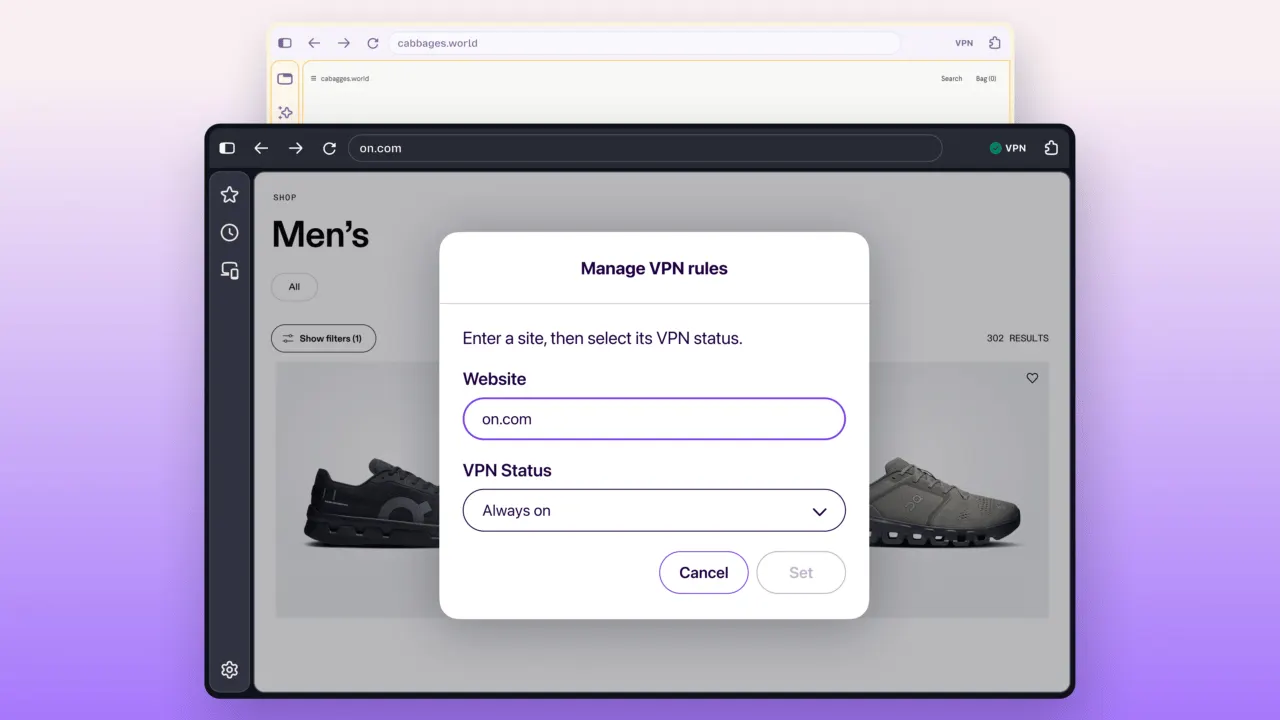
Firefox 161 can now remember which websites should go through its VPN and which shouldn't. It also gets a button that wipes your browsing data from the toolbar.
Mozilla released the update on Tuesday. The new setting is called "Manage VPN rules" and lives in the VPN panel. For any site you pick, you can set the VPN to "always on" or "always off", so you no longer have to flip the switch by hand every time you visit it.
What does the Firefox Fire button do?
The "Fire" button is rolling out from Tuesday in standard Firefox windows. One click clears your data straight from the toolbar. You choose what it deletes: browsing history, downloads history, cookie data, site data, temporary files, saved form info, and website permissions and preferences.
A warning for the enthusiastic: if you set it to delete all of that, clicking it signs you out of everything and opens a fresh Firefox window. That is the point, but it may surprise you in the middle of a work session.
What else is new in Firefox 161?
There is now an option to create a keyboard shortcut for copying the URL of your current tab. On Android, the "read aloud" feature in Reader Mode, which strips a page down to its text, has arrived too.
Mozilla also says Firefox is now available directly through the Play Store on cars with Google built-in, so you can get it without a phone in between.
The VPN rules are the most practical change. Many people want a VPN for some sites and not for others, for example a banking page that dislikes unfamiliar connections. Until now that meant toggling it manually. Per-site rules turn that into a one-time setup.
Apps worth a look
SUMO: the number puzzleTap the right tiles, add them up, hit the target. Easy to learn, hard to master. Free, for all ages.
Dialo: learn languages by speakingTalk to an AI conversation partner; every sentence comes back corrected and explained in your language. 9 languages, A1 to C2.
ediviewer: read EDI files like documentsOpen EDIFACT and X12 messages, see every segment explained, convert to JSON/XML, export PDF and Excel. Runs locally, no upload.
giftdetect: the right gift in minutesPick who it is for, the occasion and their personality. The search engine reads product descriptions from local shops and ranks what fits. Free, no sign-up.
More from this day
See all →
Amflow UE e-bike lands well while Rivian's ALSO halts TM-B deliveries

Oil tanker hacks: up to 50 ships hit, Iran suspected

Meta Muse AI agent launches in the UK amid safety warnings

Walmart Apple Pay missing from app and website weeks after launch
More in: Software
See all →
TikTok parental controls now show parents what teens watch

Microsoft Outlook outage: some emails were lost for good

Chrome using RAM after you close it? Gemini may be why