Edit an Instagram Story after posting: 15 minutes to fix it
Instagram finally lets you edit a Story after it's live. You get 15 minutes to fix a typo, swap the music or rewrite the caption without losing views.
 SUMO· the number puzzle
 Dialo· learn languages by speaking
 ediviewer· read EDI files like documents
 giftdetect· the right gift in minutes
You can now edit an Instagram Story after posting it. No more deleting a slide because of one typo and watching it vanish from its spot in the sequence.
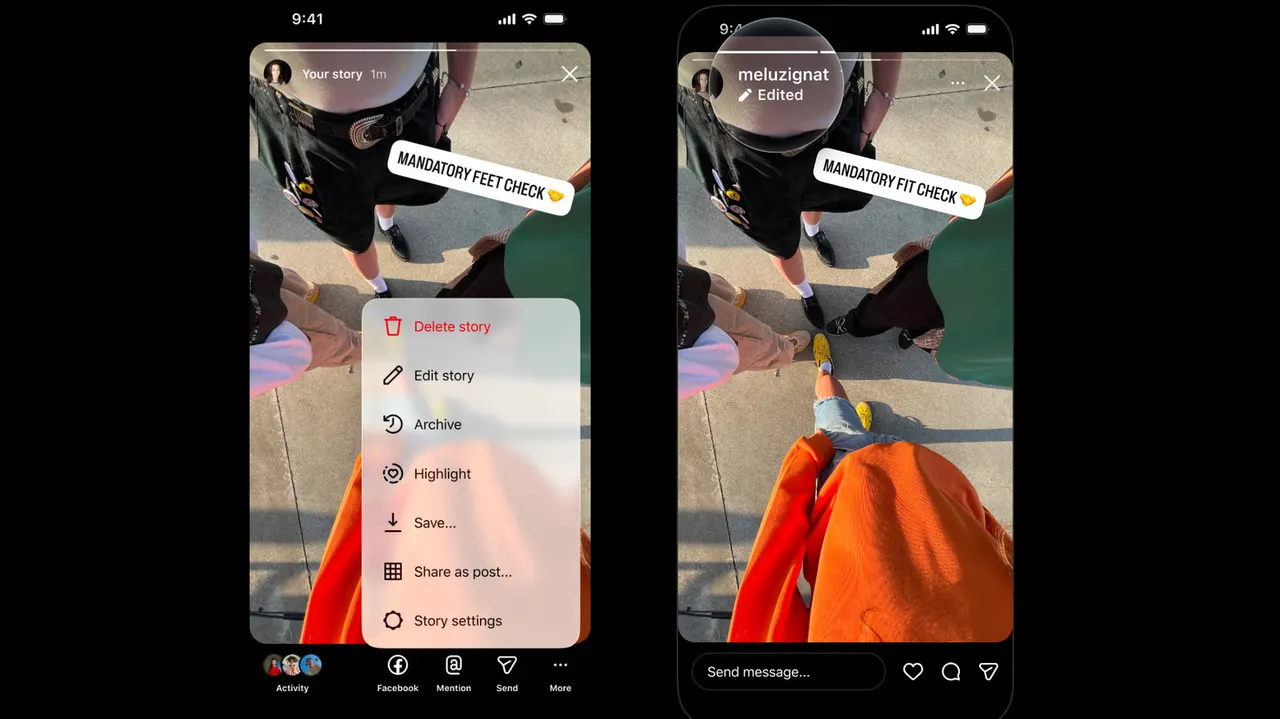
Instagram head Adam Mosseri announced the change, which gives users a 15-minute window to tweak a Story they have already shared. You can fix text, add or change the music, or write a different caption. Views, likes and replies stay attached to the post.
Stories have been central to the app for more than a decade, so the wait is a bit odd. Meta has long let people edit regular Instagram posts. Mosseri wrote that "a lot of people have been asking for this, so I'm excited to get this one out there." Meta hasn't said why it took so long.
Why deleting a Story was such a pain
Stories play in order, so if you delete one slide in the middle of a series and upload it again, it can't go back between the images before and after it. For professional creators and social media managers, a do-over can also mess with their metrics. A short editing window won't fix everything, but it does let you catch mistakes that are already live.
How to edit an Instagram Story
The feature is rolling out now, so it may not have reached your account yet. Once it has, open your Story, tap the "more" menu and choose "edit story." Edited Stories carry an "edited" label when other people view them.
Instagram is also changing the Stories composer. Background colour options now include gradients and other effects, and it is easier to share and format several images at once.
Apps worth a look
SUMO: the number puzzleTap the right tiles, add them up, hit the target. Easy to learn, hard to master. Free, for all ages.
Dialo: learn languages by speakingTalk to an AI conversation partner; every sentence comes back corrected and explained in your language. 9 languages, A1 to C2.
ediviewer: read EDI files like documentsOpen EDIFACT and X12 messages, see every segment explained, convert to JSON/XML, export PDF and Excel. Runs locally, no upload.
giftdetect: the right gift in minutesPick who it is for, the occasion and their personality. The search engine reads product descriptions from local shops and ranks what fits. Free, no sign-up.
More from this day
See all →
Kalshi halts Trump word bets after CFTC order to stop trading

Google deceptive software ads: study finds 100 million views

Citi AI agents policy: you pay if your AI tool gets hacked

CreditNirvana flaws exposed 6.6 million debt accounts
More in: Mobile
See all →
One UI 9.5 lets you download every Galaxy Over the Horizon ringtone

Phone Battery Draining When You're Not Using It? Likely Causes

Google Wallet for iPhone is here, but you can't tap to pay