Chrome still uses RAM after closing? Gemini tray setting is why
A Windows user found Chrome processes eating 300 to 700 MB of RAM after the browser was closed. The culprit was a little-known Gemini setting.
 SUMO· the number puzzle
 Dialo· learn languages by speaking
 ediviewer· read EDI files like documents
 giftdetect· the right gift in minutes
If Chrome seems to hang around in Windows Task Manager after you close it, a Gemini setting may be the reason. One user tracked down exactly that after a long hunt.
They noticed several Chrome processes still running after the window was closed, using between 300 and 700 MB of RAM. The option to keep background apps running when Chrome closes was already switched off. So they tried everything else: disabling extensions, removing web apps, clearing cache and cookies, resetting Chrome, and turning off hardware acceleration, page preloading and on-device AI features. Nothing worked.
The clue came from a fresh Chrome profile with no account signed in. In that profile, Chrome unloaded from memory completely after closing. That pointed to something tied to the signed-in profile, and it turned out to be a setting few people know about.
How to stop Chrome running in the background because of Gemini
The setting keeps Gemini available even when the Chrome window is minimised or closed, so the browser leaves a background process running. Switching it off lets Chrome shut down fully and frees the memory.
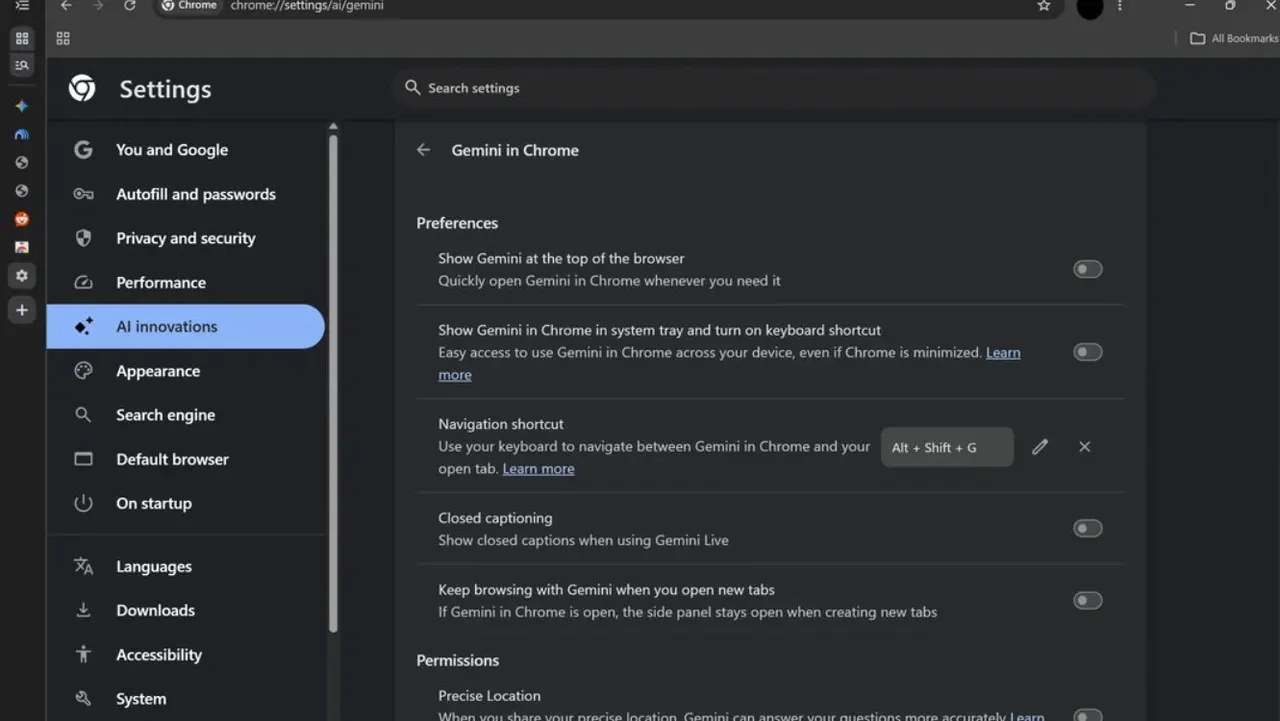
To check it, open chrome://settings/ai/gemini, or go to Settings > AI innovations > Gemini. Under Preferences, find "Show Gemini in Chrome in system tray and turn on keyboard shortcut" and turn it off. Google's own help page mentions the feature: with it on, a Gemini icon appears in the Windows system tray and you can use keyboard shortcuts to reach the assistant.
Google's help page has changed
Neowin found that this help article is now harder to use. The older version had step-by-step instructions for showing or hiding Gemini in the browser, the Mac menu bar and the Windows tray, plus a tip about pinning and unpinning it. The current version appears to be AI-generated and sends people to the Gemini chatbot for answers. What's there is mostly general information about chatting with Gemini.
This isn't the first Chrome oddity of this kind. Earlier, a Windows 11 user found an idle Chrome extension that wrote hundreds of gigabytes to an SSD in three days, and tracked it down with Windows' built-in monitoring tools.
Apps worth a look
SUMO: the number puzzleTap the right tiles, add them up, hit the target. Easy to learn, hard to master. Free, for all ages.
Dialo: learn languages by speakingTalk to an AI conversation partner; every sentence comes back corrected and explained in your language. 9 languages, A1 to C2.
ediviewer: read EDI files like documentsOpen EDIFACT and X12 messages, see every segment explained, convert to JSON/XML, export PDF and Excel. Runs locally, no upload.
giftdetect: the right gift in minutesPick who it is for, the occasion and their personality. The search engine reads product descriptions from local shops and ranks what fits. Free, no sign-up.
More from this day
See all →
Tim Sweeney says Claude blocked his set theory work as "distillation"
Hisense TV sends Nexxen an audio fingerprint every 2.7 seconds

Softonic bought by China's Newborn Town for up to €50 million

P vs NP: Anthropic and OpenAI Post Near-Twin Math Preprints
More in: Software
See all →
Microsoft Code Red after 24-hour Outlook and Teams outage

Ladybird browser tested: a new engine, but don't switch yet

New browser with its own engine aims to break from Chrome and Firefox