Apple HomeView teardown: iFixit fights glue at every step
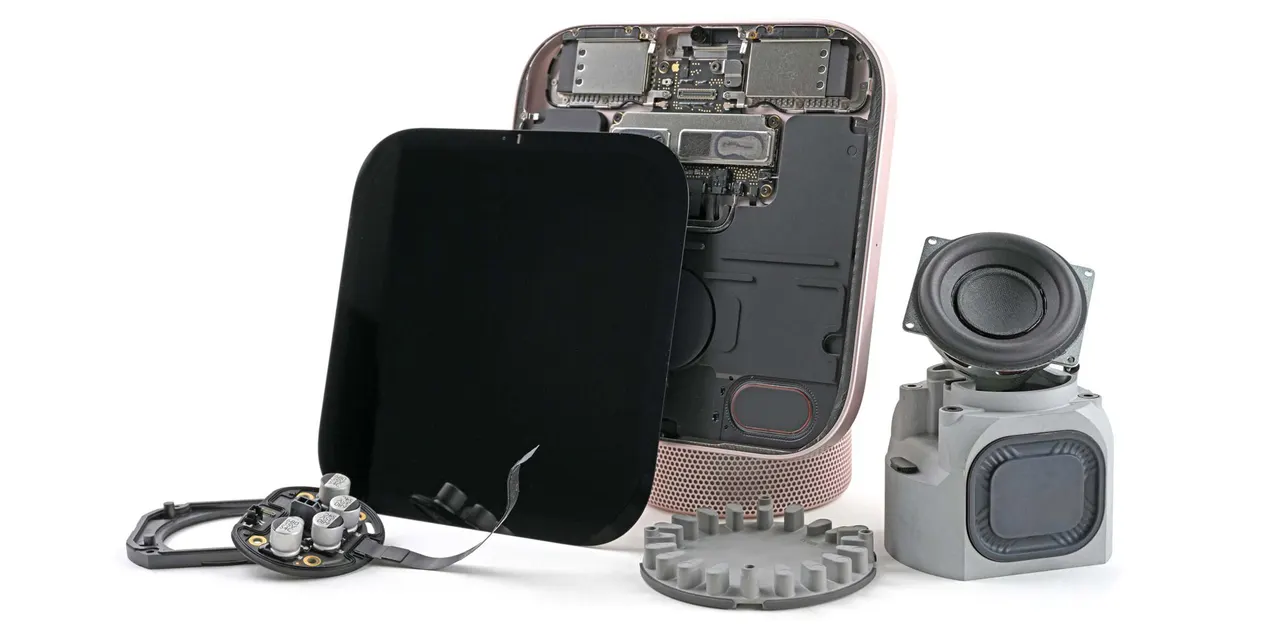
iFixit took apart the Apple HomeView and found glue on the display, speakers, antennas and logic board. One speaker broke during removal.
 SUMO· the number puzzle
 Dialo· learn languages by speaking
 ediviewer· read EDI files like documents
 giftdetect· the right gift in minutes
If you were hoping the Apple HomeView would be easy to repair, iFixit has bad news. Its teardown of the new smart display shows a device that fought back nearly all the way through.
The repair site published the teardown a week after the HomeView launched. The display, speakers, antennas and logic board are all held in with glue or adhesive. Even after iFixit soaked the adhesive under the display's speakers in isopropyl alcohol, one of them broke apart during removal. The logic board needed considerable force to pull off the chassis, because thermal adhesive holds it in place.
That is a step backwards from other recent Apple teardowns, which found more modular parts and easier access to the insides.
What is different between the two HomeView models?
iFixit opened both versions, the tabletop model and the wall-mounted one. The wall-mounted version has a slightly wider logic board, because it has to fit capacitors that sit in the base of the tabletop model. It also has smaller internal speakers. That helps explain the audio differences Apple already admitted to at launch.
Is the HomeView repairable?
Not really. On the tabletop model, separating the display from the base takes either specialized tools or extensive, possibly destructive disassembly of the display assembly. Apple routed the connecting cables through the pivot mechanism, which is what makes it so awkward.
There is some good news in the base. The USB-C port is modular and fairly easy to reach, and so are the passive radiators and the board that runs the lower assembly. Still, the cable between the woofer and the board underneath is extremely short. iFixit wondered how anyone would reconnect it when putting the thing back together.
iFixit has no official repairability score for this kind of device. Shahram Mokhtari joked that he would give the HomeView a "BEEP this thing" out of 10. The full post includes an interactive 3D CT scan of the HomeView.
Apps worth a look
SUMO: the number puzzleTap the right tiles, add them up, hit the target. Easy to learn, hard to master. Free, for all ages.
Dialo: learn languages by speakingTalk to an AI conversation partner; every sentence comes back corrected and explained in your language. 9 languages, A1 to C2.
ediviewer: read EDI files like documentsOpen EDIFACT and X12 messages, see every segment explained, convert to JSON/XML, export PDF and Excel. Runs locally, no upload.
giftdetect: the right gift in minutesPick who it is for, the occasion and their personality. The search engine reads product descriptions from local shops and ranks what fits. Free, no sign-up.
More from this day
See all →
Cuts Make, Naver Webtoon's AI app, is Google Play's best app of 2026

War Bear: the Chinese tracked riot robot with a grenade launcher
Google Wallet for iPhone is out now, but without tap-to-pay