2026 Kindle back panel pops off when you remove the case
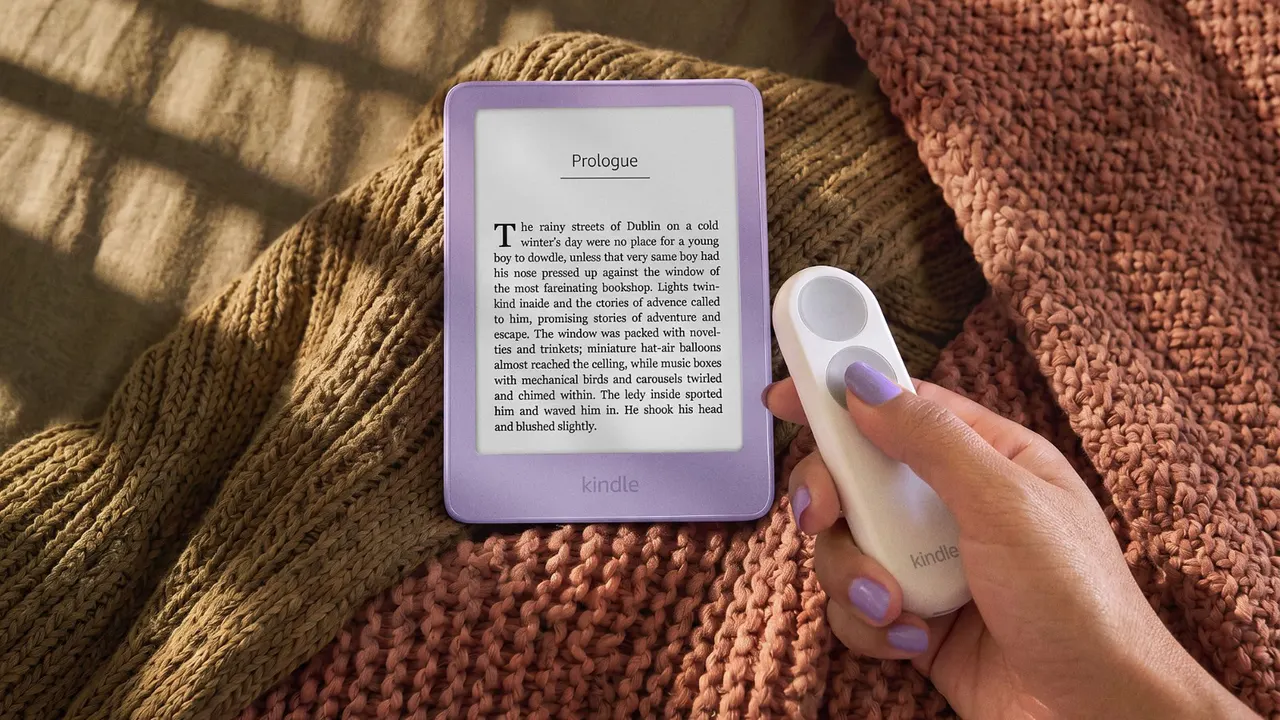
Owners of the 2026 Kindle and Kindle Paperwhite say the removable back panel can come loose when they take off a case, even Amazon's own cover.
 SUMO· the number puzzle
 Dialo· learn languages by speaking
 ediviewer· read EDI files like documents
 giftdetect· the right gift in minutes
If you own a 2026 Kindle or Kindle Paperwhite, taking off its case may also take off the back of the device. Owners are reporting that the new removable back panel can pop loose when a protective case comes off.
Amazon redesigned its Kindle lineup in October, and easier battery replacement was a headline change. The hint came back in May. For a gadget people keep for years, a battery you can swap yourself is welcome. The catch is a panel that, in some cases, doesn't stay put.
A Kindle owner on Reddit showed their Ube Kindle coming apart as the case was removed. TikTok creator Jackie's Book Tally showed the same thing while peeling off a clear case to put stickers on the back. It isn't only third-party cases. Mashable repeatedly hit the problem when pulling the basic Kindle out of Amazon's official fabric cover, and a reader said the back of their 2026 Paperwhite came off completely. They returned it and went for the 2024 Paperwhite Signature Edition instead.
Which Kindles are affected?
So far, only the standard 2026 Kindle and the Kindle Paperwhite. The aluminum Kindle hasn't shown the problem. TechRadar's testing found it uses two small screws near the USB-C port to hold its housing together, while the plastic models snap on. The Paperwhite Signature Edition hasn't been reported either.
How do you fix a Kindle back panel that came off?
Amazon says you can press the panel back into place. Reassembly can cause alignment problems, though. The separation doesn't seem to affect how the Kindle works, but it can leave a visible gap around the screen.
A fix may not mean giving up the removable panel. Amazon could redesign its cases so the Kindle slides out more easily without loosening its grip. Until then, remove the case slowly and watch the back edge.
Apps worth a look
SUMO: the number puzzleTap the right tiles, add them up, hit the target. Easy to learn, hard to master. Free, for all ages.
Dialo: learn languages by speakingTalk to an AI conversation partner; every sentence comes back corrected and explained in your language. 9 languages, A1 to C2.
ediviewer: read EDI files like documentsOpen EDIFACT and X12 messages, see every segment explained, convert to JSON/XML, export PDF and Excel. Runs locally, no upload.
giftdetect: the right gift in minutesPick who it is for, the occasion and their personality. The search engine reads product descriptions from local shops and ranks what fits. Free, no sign-up.
More from this day
See all →
Nvidia Blackwell chips found at Shanghai data center tied to Alice Huang

Anthropic hunger strike: protester demands end to self-improving AI

X parental controls for teen accounts: what parents can see