X parental controls: parents can now set teens' screen time
X now lets parents cap daily screen time and approve followers on teen accounts, but they still can't read private messages or see search history.
 SUMO· the number puzzle
 Dialo· learn languages by speaking
 ediviewer· read EDI files like documents
 giftdetect· the right gift in minutes
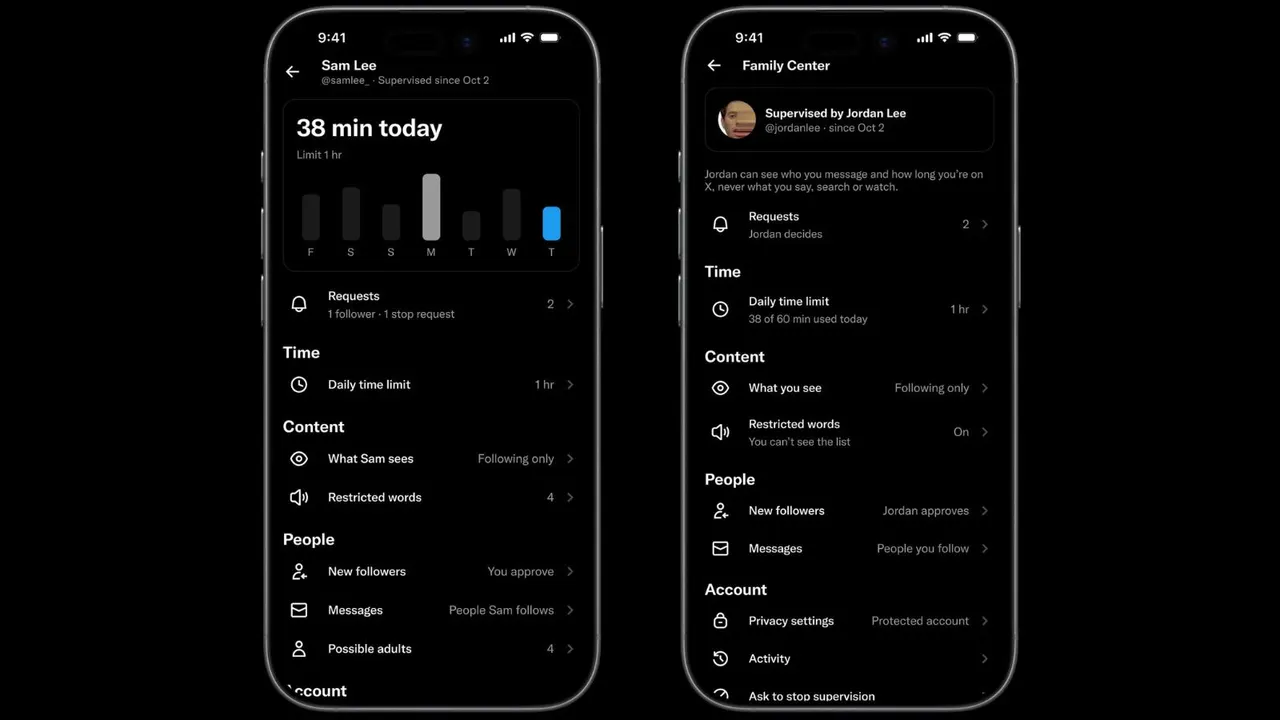
X has added parental controls for teenagers, and the setup is more detailed than you might expect. Parents can cap daily screen time, approve new followers and see who their child is messaging. They can't read the messages themselves.
The company announced the feature on Thursday, November 26, through its Safety account. It covers users aged 13 to 17. Their accounts are automatically placed in protected mode, which blocks sensitive content and targeted ads.
What can parents do with X parental controls?
Parents and guardians can see how much time a teen spends on X each week and set a daily limit. They can approve new followers, restrict feed recommendations and videos, and block specific words from appearing in the feed.
Direct messages get their own controls. Parents decide who can message their child, for example only people the teen follows or verified accounts, and they can see which accounts the teen is exchanging messages with.
Privacy settings are also in reach. Parents can limit who can tag the teen in photos, stop the account from being found by email address or phone number, and turn off location information on posts.
What can't parents see?
X has drawn some lines. Parents can't read private messages, can't view search or viewing history, and can't post on a teen's behalf. Teens can also see every restriction applied to their account, so they know which settings a parent changed.
Michael O'Herlihy, X's Head of Safety, said: "Parents want practical tools, and teens deserve room to grow." He added that families can set guardrails while teens keep ownership of their accounts.
The launch comes as social platforms face pressure over children's exposure to inappropriate content and harmful contact. X has been criticised over moderation and child safety before, including after its AI chatbot Grok was misused to generate sexually explicit images.
Apps worth a look
SUMO: the number puzzleTap the right tiles, add them up, hit the target. Easy to learn, hard to master. Free, for all ages.
Dialo: learn languages by speakingTalk to an AI conversation partner; every sentence comes back corrected and explained in your language. 9 languages, A1 to C2.
ediviewer: read EDI files like documentsOpen EDIFACT and X12 messages, see every segment explained, convert to JSON/XML, export PDF and Excel. Runs locally, no upload.
giftdetect: the right gift in minutesPick who it is for, the occasion and their personality. The search engine reads product descriptions from local shops and ranks what fits. Free, no sign-up.
More from this day
See all →
Credit card skimming via WebRTC found at online shops on Black Friday

SpaceX Starmind: FCC approves 1 million satellites for orbit
Apple must hand Epic Games 3,200 documents in App Store fight

Google Play developer address and phone number plan under review
More in: Web & Dev
See all →
Right to be forgotten for kids: teens ask to delete posts by parents
Beget domain registration is back after a cyberattack wiped its cloud
LinkedIn contact export will drop emails and job titles on Dec 20