PC Turbo button: it never made your computer faster
The Turbo button on 1980s and 90s PCs sounded like a speed boost. It actually did the opposite when switched off, slowing the CPU down for old software.
 SUMO· the number puzzle
 Dialo· learn languages by speaking
 ediviewer· read EDI files like documents
 giftdetect· the right gift in minutes
Millions of people pressed the Turbo button on their PC case expecting a speed boost. It never gave them one. If anything, it was the other way round.
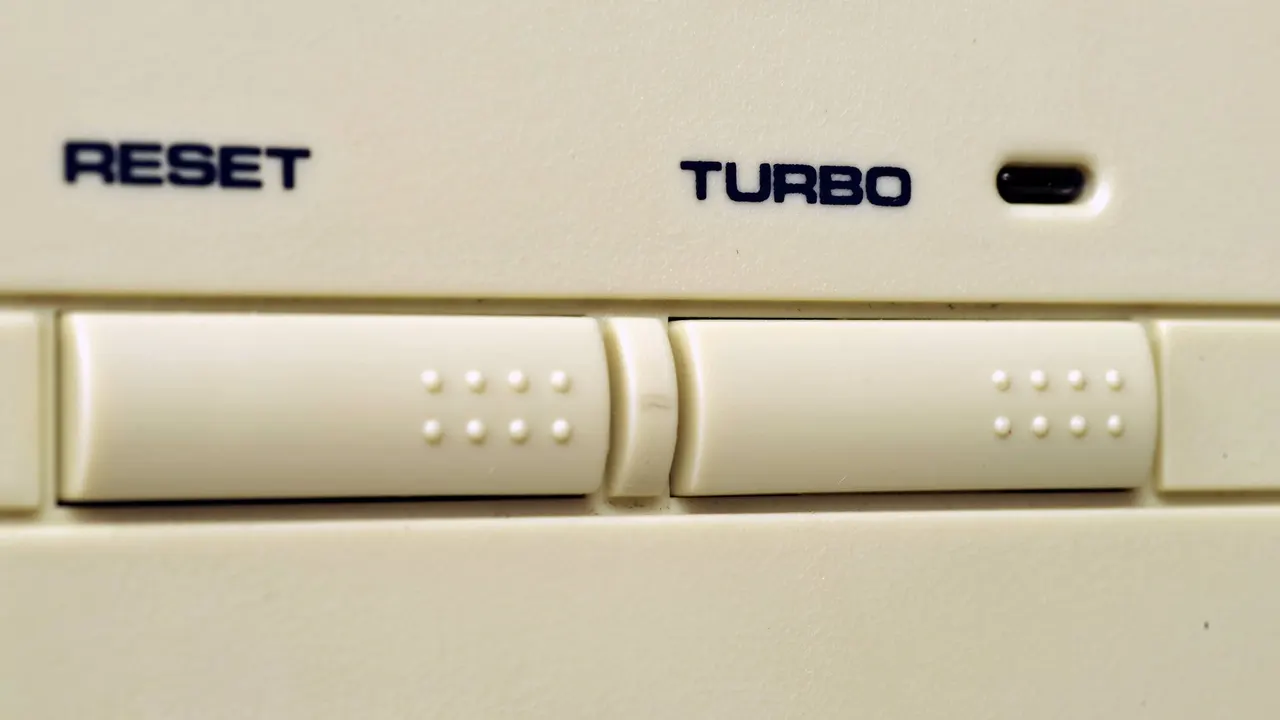
The button showed up on many computers in the second half of the 1980s, mostly machines with Intel 80286, 80386 and 80486 processors. Cases usually had a light next to it and a small LED display showing the speed. Press Turbo and the computer ran at its normal speed. Switch it off and everything slowed down.
What did the Turbo button actually do?
The switch was wired to the motherboard and changed the speed at which the processor worked. Flipping it altered the CPU clock frequency or the way the chip received its timing signals. With Turbo on, the processor ran at its rated speed, for example 16, 25 or 33 MHz. With it off, the board dropped the speed to imitate an older processor, sometimes adding extra wait mechanisms on top.
Why did PCs need a slow mode?
The reason goes back to the early IBM PC. Many games and programs of that time relied on the raw speed of the processor to handle timing and animation. Developers wrote their software around that frequency, without expecting it to change.
Then faster processors arrived, and old software ran too fast because it did not use proper timers. Instead of rewriting everything, manufacturers added a compatibility mode that brought the PC closer to the experience of the first IBM machines.
The name did the rest. "Turbo" suggested something like an overclock. Some makers went further and faked the readout: the display jumped from 8 MHz to 33 MHz when Turbo was on, as if you had just unlocked the chip's full power. In reality 33 MHz was the speed the PC was built to run at all along.
The button faded from the mid-1990s and was gone by the end of the decade. Windows 95 and its applications already used more precise timers, so they no longer depended on raw processor speed. Compatibility problems were solved by other techniques and tools, and the switch became obsolete.
Apps worth a look
SUMO: the number puzzleTap the right tiles, add them up, hit the target. Easy to learn, hard to master. Free, for all ages.
Dialo: learn languages by speakingTalk to an AI conversation partner; every sentence comes back corrected and explained in your language. 9 languages, A1 to C2.
ediviewer: read EDI files like documentsOpen EDIFACT and X12 messages, see every segment explained, convert to JSON/XML, export PDF and Excel. Runs locally, no upload.
giftdetect: the right gift in minutesPick who it is for, the occasion and their personality. The search engine reads product descriptions from local shops and ranks what fits. Free, no sign-up.
More from this day
See all →
Comet 220P/McNaught suddenly got 1,000 times brighter. Here's why

Coral Hart used AI to write 370 books in 20 months

WhatsApp Zaps: self-deleting photos and videos for any chat

Green SM taxis: Karnataka halts new registrations, eyes mandatory meters
More in: Hardware
See all →
Myofree tablet only works with special glasses to rest your eyes

Trump's Nvidia stock worth $62 million as H200 chips cleared for China
RuStore will be preinstalled on every Smart TV sold in Russia