Oldest program that still runs on Windows 11 is a 1992 CD player
A developer called Enlyth went looking for the oldest app that still starts on Windows 11 without emulation. He found a CD player from November 1992.
 SUMO· the number puzzle
 Dialo· learn languages by speaking
 ediviewer· read EDI files like documents
 giftdetect· the right gift in minutes
What is the oldest program that still runs on Windows 11? A developer who goes by Enlyth set out to answer that, and the winner is a CD player compiled in November 1992. It starts on Windows 11 with no emulation and no modifications.
The rules were simple: a graphical app, running natively. That rules out anything 16-bit. According to Microsoft's compatibility documentation, the x64 and ARM versions of Windows don't support 16-bit x86 code of any kind, so every candidate has to be a 32-bit program. That points to the early days of Windows NT, whose first release, NT 3.1, arrived on 27 July 1993 as a 32-bit system.
How far back does Windows 11 compatibility go?
There is a shortcut. Someone on an anonymous forum told Enlyth about Win32s, a set of libraries that let 32-bit apps run on Windows 3.1, acting as a bridge between the two eras. Early versions of Win32s shipped with FreeCell, and the copy he found, dated 22 February 1993, runs on Windows 11 untouched.
He kept digging through pre-release builds of Windows NT 3.1 and landed on the CD player from build 347, linked on 16 November 1992. It also launches. His PC has no CD drive, so the app warns that there is no CD-ROM drive. To check that it could play music, he used a small library that fakes a drive with dummy audio, as he explains in his blog.
Going back to 1985 takes a bit of cheating
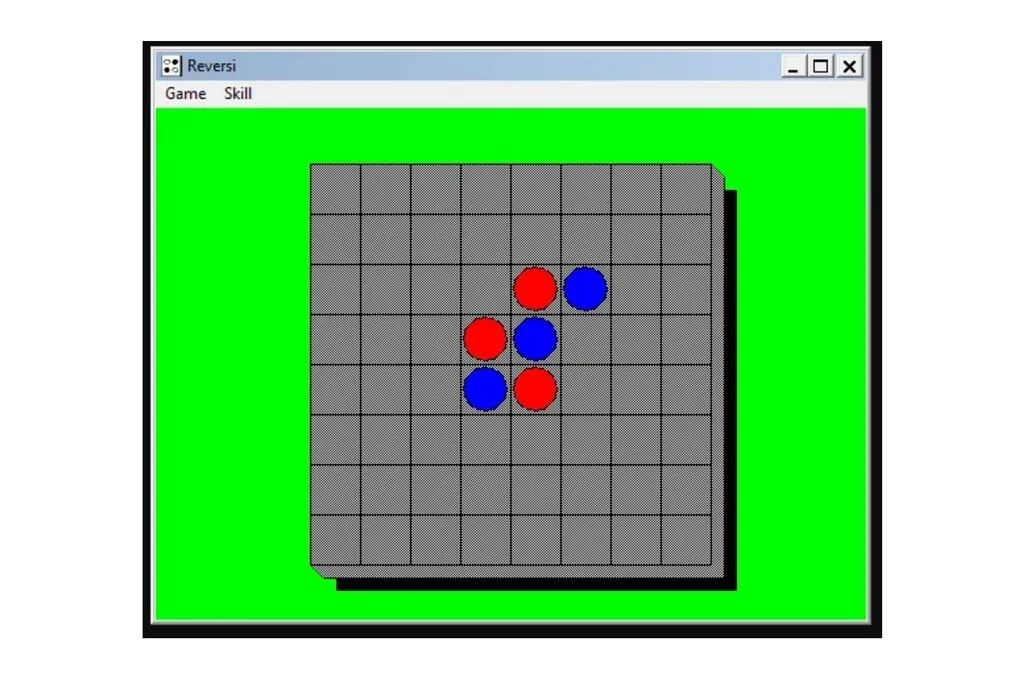
Going further means breaking the rules. With otvdm, a Wine-based tool that runs 16-bit programs on 64-bit Windows, Enlyth played Reversi from Windows 1.01, dated 15 November 1985. It is the computer version of a board game from the 1880s, credited to Lewis Waterman. The author admits that using otvdm is cheating.
So the honest answer is about 34 years for a program that runs with no help at all. Add the Wine-based compatibility layer and the number stretches to 41 years.
Apps worth a look
SUMO: the number puzzleTap the right tiles, add them up, hit the target. Easy to learn, hard to master. Free, for all ages.
Dialo: learn languages by speakingTalk to an AI conversation partner; every sentence comes back corrected and explained in your language. 9 languages, A1 to C2.
ediviewer: read EDI files like documentsOpen EDIFACT and X12 messages, see every segment explained, convert to JSON/XML, export PDF and Excel. Runs locally, no upload.
giftdetect: the right gift in minutesPick who it is for, the occasion and their personality. The search engine reads product descriptions from local shops and ranks what fits. Free, no sign-up.
More from this day
See all →
Nāpōwawāʻenakaulua: Webb Finds Earliest Quasar Pair Ever

United Airlines AI agent ban: bots can't tick the check-in box
Jensen Huang resigns as Nvidia CEO; Colette Kress steps in as interim

Windows WinSxS folder: the DISM command that frees up to 10 GB
More in: Software
See all →
GPU Taskman shows which process is eating your VRAM

KORA OS: a Linux-based system built around AI, due in 2027
Windows 11 End Task button on the taskbar is off by default