Microsoft 365 companion apps shut down Dec 16 after 14 months
Microsoft is retiring its People, Files and Calendar companion apps on December 16, just 14 months after launch. Here is what to use instead and how to remove them.
 SUMO· the number puzzle
 Dialo· learn languages by speaking
 ediviewer· read EDI files like documents
 giftdetect· the right gift in minutes
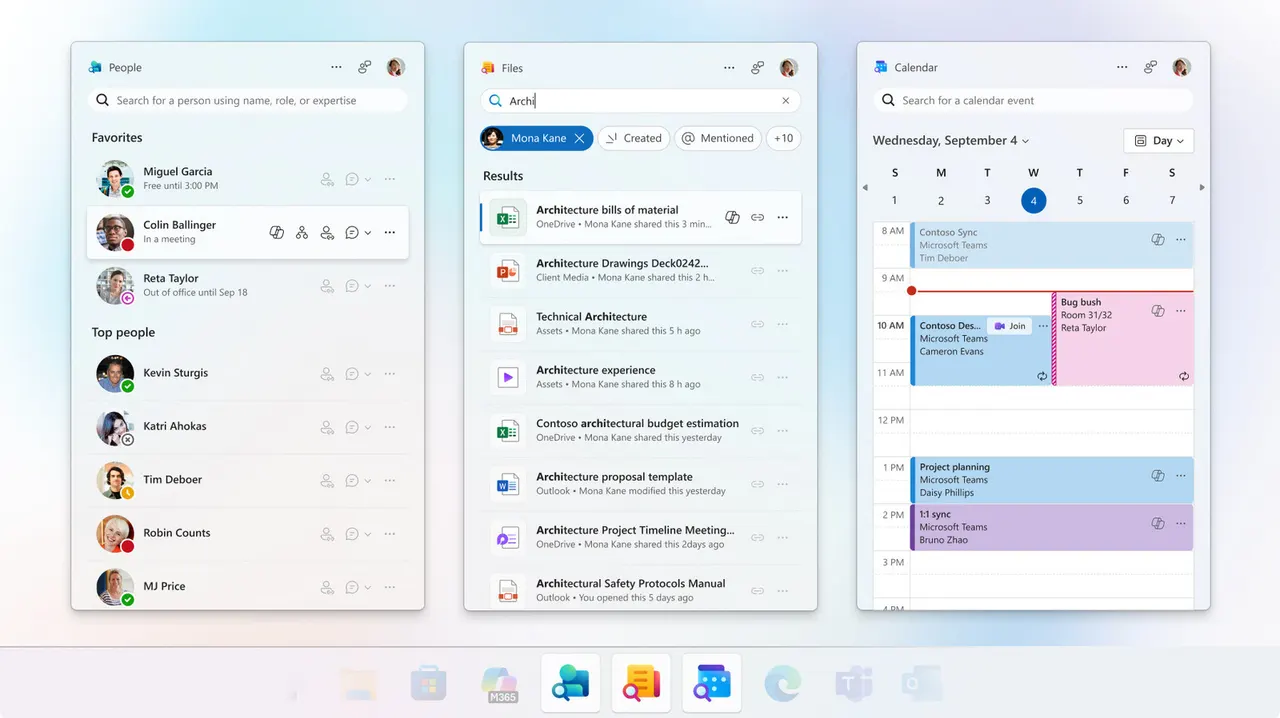
Microsoft launched three little taskbar apps for Windows 11 just 14 months ago. On December 16, the Microsoft 365 companion apps stop working: People, Files and Calendar are all being retired.
You may never have seen them. They were aimed at employer-managed Windows 11 devices, and Microsoft installed them automatically for people with commercial Microsoft 365 and Office 365 licenses. If you run Windows 11 Home, you likely never had them.
Why are the Microsoft 365 companion apps going away?
Microsoft's support post doesn't say. A plausible guess is low use. The apps overlapped with tools Windows already has, so plenty of people may have ignored them or stripped them off work machines as bloatware.
People let you find colleagues, start Teams calls, check someone's status or org chart position, and pin favorites. It also had a Copilot link for asking what a coworker is working on. Files let you open, search and share Office files by link. Calendar showed your Microsoft 365 events, let you edit them and join meetings.
What to use instead
Outlook for Windows has tabs for Calendar, Contacts and email, which covers the Calendar app. Teams handles messaging, calendar viewing and video calls, so it takes over part of People and Calendar. For files, use the Windows Start Menu search bar or OneDrive, on the desktop or in a browser. Outside Microsoft's ecosystem, Slack and Google Workspace do similar jobs.
How to uninstall the companion apps
If your employer manages your PC, your IT admin will probably remove them for you. Otherwise, open Windows Settings > Apps > Installed Apps, search for "Microsoft 365 companions", click the three dots and choose "Uninstall".
You won't lose anything. The apps pull data from SharePoint Online and Exchange Online, and Microsoft's support page says that data stays in your Microsoft 365 services, not in the app files.
Apps worth a look
SUMO: the number puzzleTap the right tiles, add them up, hit the target. Easy to learn, hard to master. Free, for all ages.
Dialo: learn languages by speakingTalk to an AI conversation partner; every sentence comes back corrected and explained in your language. 9 languages, A1 to C2.
ediviewer: read EDI files like documentsOpen EDIFACT and X12 messages, see every segment explained, convert to JSON/XML, export PDF and Excel. Runs locally, no upload.
giftdetect: the right gift in minutesPick who it is for, the occasion and their personality. The search engine reads product descriptions from local shops and ranks what fits. Free, no sign-up.
More from this day
See all →
Coral Hart used AI to write 370 books in 20 months

WhatsApp Zaps: self-deleting photos and videos for any chat

Green SM taxis: Karnataka halts new registrations, eyes mandatory meters

Chase outage: Zelle and bank transfers delayed across the US
More in: Software
See all →
Siri AI daily limits: Apple tests caps tied to iCloud Plus
Toque for Lidl Monsieur Cuisine Connect makes the slow robot fast

Android Time Machine lets you run Android 2.1 to 7.1 in a browser