Android Time Machine lets you run Android 2.1 to 7.1 in a browser
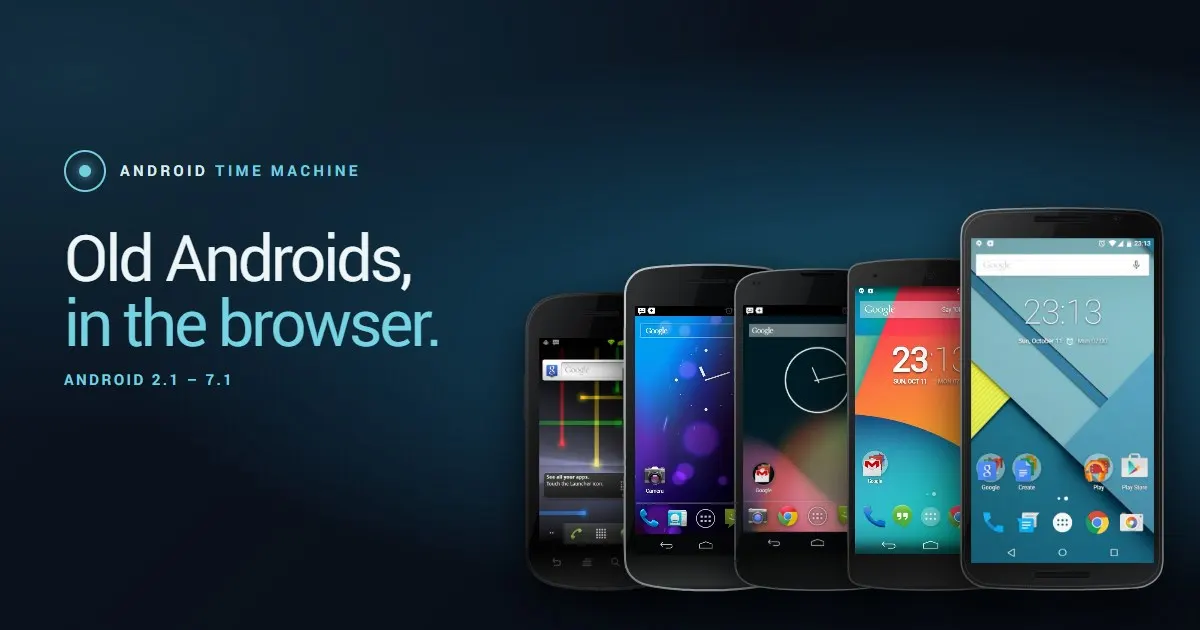
A developer known as szabolevi98 built Android Time Machine, a free browser simulator with five Nexus phones, each running a classic Android version.
 SUMO· the number puzzle
 Dialo· learn languages by speaking
 ediviewer· read EDI files like documents
 giftdetect· the right gift in minutes
If you miss the look of Ice Cream Sandwich or want to see how Android started out, you no longer need a dusty old phone. A developer going by szabolevi98 has released Android Time Machine, an open-source simulator that runs in your browser.
The project offers five Nexus phones, each showing a different classic version of Android, from 2.1 up to 7.1. One of the examples is Android 4.0.4 Ice Cream Sandwich on a Galaxy Nexus. You pick a phone, press the "Запустить симулятор" (launch simulator) button, and the interface of that era opens on the page.
What is Android Time Machine?
In the author's words, it is an interactive browser simulator of classic Android versions. Each version runs on its own Nexus phone. The systems were rebuilt from the AOSP source code (the open-source base of Android), factory firmware images and screenshots from the matching period.
Technically it is simple. The project uses static HTML, CSS and JavaScript, so there is no real Android running underneath. The web version and the code on GitHub are both public.
How realistic is it?
You can open different apps on each phone, including the browser. The launching is imitated, so don't expect a working old Android. According to the project description, the main interface elements are used in their original form.
That makes it more of a museum piece than an emulator. It suits anyone who wants to study early mobile design, compare how menus and icons changed between versions, or just feel a bit nostalgic. Because the source is open, others can look at how it was built and, presumably, build on it.
Apps worth a look
SUMO: the number puzzleTap the right tiles, add them up, hit the target. Easy to learn, hard to master. Free, for all ages.
Dialo: learn languages by speakingTalk to an AI conversation partner; every sentence comes back corrected and explained in your language. 9 languages, A1 to C2.
ediviewer: read EDI files like documentsOpen EDIFACT and X12 messages, see every segment explained, convert to JSON/XML, export PDF and Excel. Runs locally, no upload.
giftdetect: the right gift in minutesPick who it is for, the occasion and their personality. The search engine reads product descriptions from local shops and ranks what fits. Free, no sign-up.
More from this day
See all →
Coral Hart used AI to write 370 books in 20 months

WhatsApp Zaps: self-deleting photos and videos for any chat

Green SM taxis: Karnataka halts new registrations, eyes mandatory meters

Chase outage: Zelle and bank transfers delayed across the US
More in: Software
See all →
Siri AI daily limits: Apple tests caps tied to iCloud Plus
Toque for Lidl Monsieur Cuisine Connect makes the slow robot fast
Microsoft 365 companion apps shut down Dec 16 after 14 months