Gemini Notebook can now turn your notebook into a website
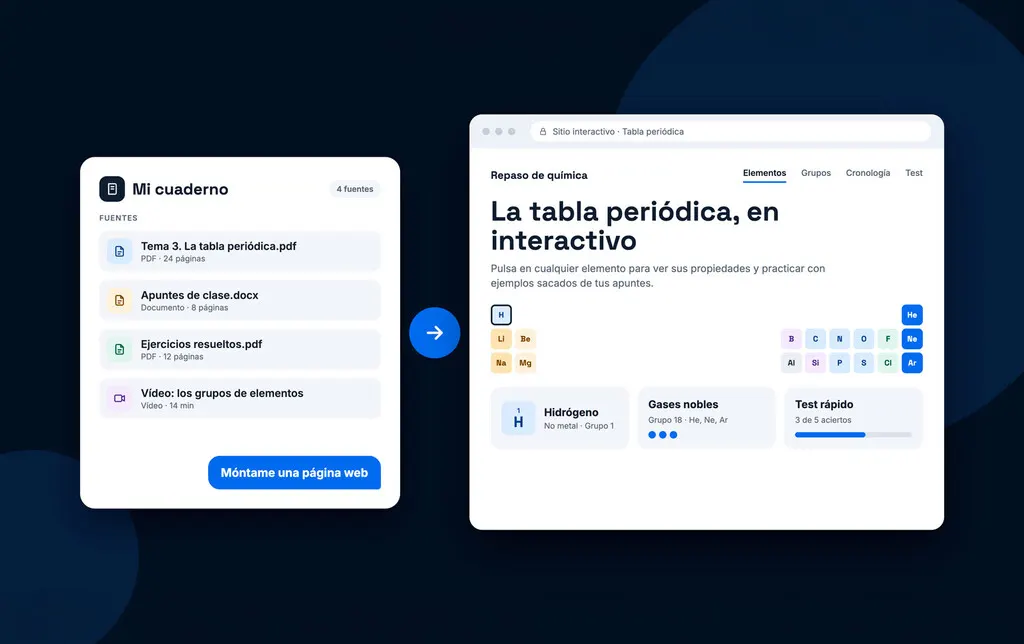
Gemini Notebook, the tool formerly known as NotebookLM, can now build an interactive web page from your notebook if you simply ask it to.
 SUMO· the number puzzle
 Dialo· learn languages by speaking
 ediviewer· read EDI files like documents
 giftdetect· the right gift in minutes
Type "build me a web page" into Gemini Notebook and the AI will turn your notebook into a working website. That is the new feature Google has added to the tool, which used to be called NotebookLM before its rename in July.
Here is how it works. You load your documents, files and links into a notebook as sources, and Gemini answers from those files instead of searching elsewhere. That cuts down on hallucinations, though it does not remove them. Now it can also organise everything into a page that is more visual and easier to navigate, links included.
The page is saved inside the notebook itself. It shows up in the Studio area, and one click on its icon opens it on screen. Google lets you open it in a new tab and share it with other people.
How do you make a website in Gemini Notebook?
You only need a short prompt. Generation takes a few minutes, depending on how many sources the notebook holds. A reviewer who tried it built a full page from a presentation stored in the tool and called the result very good: polished, minimalist, and a good companion to the slides (downloadable as PDF or PowerPoint) and infographics Notebook already produces.
Is this new?
Not entirely. Before, you could add a notebook as a source in the Gemini app and ask the Canvas tool for a web page. What changes is that it now happens without leaving Gemini Notebook, and the page stays handy in Studio. In the tester's experience, Google also improved the quality and the way the AI structures the content.
Availability
There is nothing to switch on. The feature is rolling out worldwide, so if you do not see it yet, you will have to wait a little. Google has not said whether the free and paid plans differ.
Apps worth a look
SUMO: the number puzzleTap the right tiles, add them up, hit the target. Easy to learn, hard to master. Free, for all ages.
Dialo: learn languages by speakingTalk to an AI conversation partner; every sentence comes back corrected and explained in your language. 9 languages, A1 to C2.
ediviewer: read EDI files like documentsOpen EDIFACT and X12 messages, see every segment explained, convert to JSON/XML, export PDF and Excel. Runs locally, no upload.
giftdetect: the right gift in minutesPick who it is for, the occasion and their personality. The search engine reads product descriptions from local shops and ranks what fits. Free, no sign-up.
More from this day
See all →
AI avatar YouTube channel gets 100 dislikes and 10 likes

Windows 11 telemetry flags Codex and Claude, even a renamed cmd.exe

iPhone Duo crackgate: Apple accused of silencing a supplier