ClawDOS puts a Claude coding agent on a 1980s IBM PC running DOS
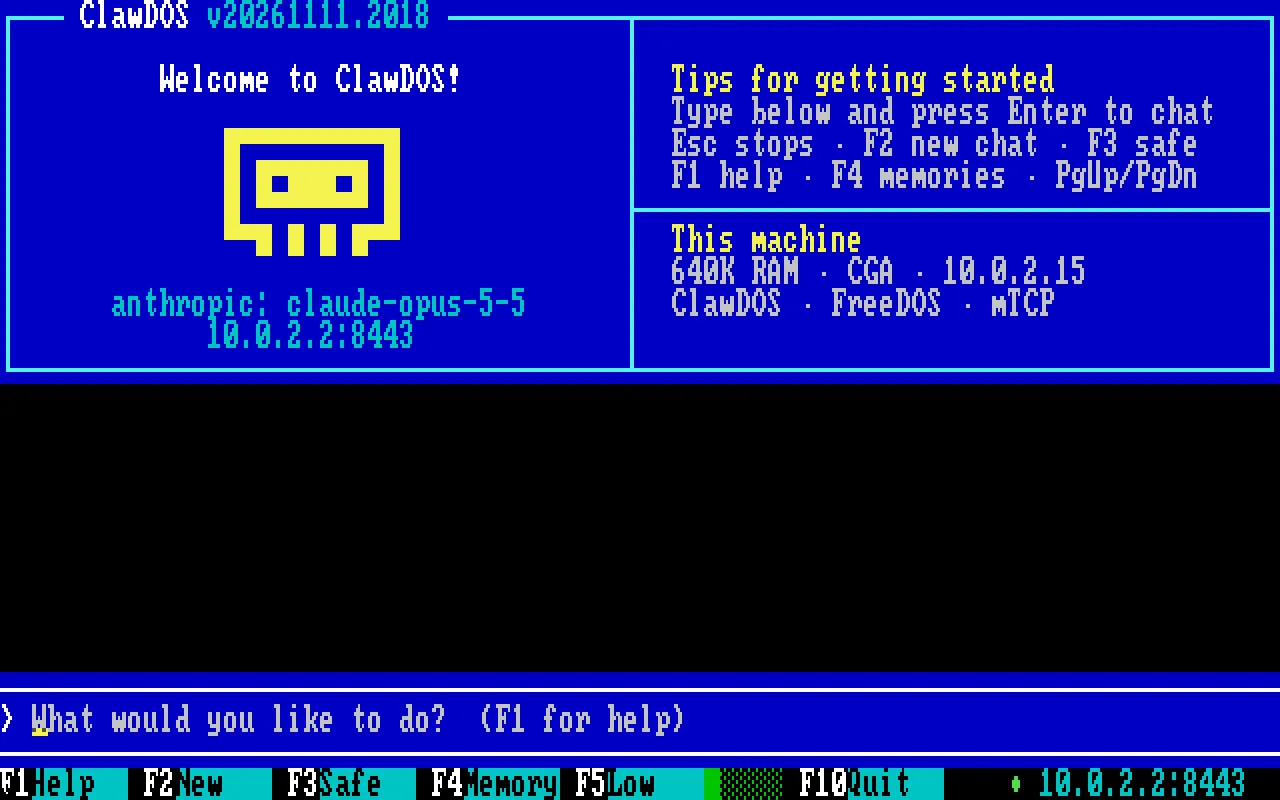
ClawDOS is an open-source coding agent that runs on a real IBM PC under DOS. It writes C, compiles it with Turbo C and runs it. The code was written by Claude.
 SUMO· the number puzzle
 Dialo· learn languages by speaking
 ediviewer· read EDI files like documents
 giftdetect· the right gift in minutes
Type CLAWDOS at the C:> prompt of a vintage IBM PC and you can chat with Claude, which will then write, compile and run programs on the old machine. That is the idea behind ClawDOS, an open-source project from developer Rich Acosta, built together with Claude itself.
Acosta says the IBM PC was his first computer, and his collection now centres on a fully loaded IBM PC 5160. Its 20 MB hard disk still works but is switched off. A PicoMEM module emulates a disk from an SD card instead. He wanted to see what an AI agent can do far from modern standards, and whether what it builds could build something else in turn. All the code in the repository was written by Claude, he says, except the text of the project's description.
How does ClawDOS work on an 8088 PC?
The agent can read and edit files, write programs, compile them with Turbo C, run them and analyse the output. It keeps context between sessions, so you can pick up where you stopped. The 176 KB HARNESS.EXE talks to the Claude Messages API, builds requests, parses replies, runs tools and saves each conversation to disk. The 8088 processor does all of this except TLS, the encryption layer, which it cannot handle. A second computer acts as a bridge for that part.
In one test, Acosta asked for PRIMES.C, printing primes below 100, compiled and run. The answer appeared 64 seconds after Enter, 26 of them spent on compiling, linking and running. During a build, ClawDOS saves its state and unloads, leaving Turbo C about 450 KB of memory, then returns with the result.
The agent also wrote a tribute to a 1983 film on the PC itself: a vector world map, missiles over the pole, a tic-tac-toe endgame and a score for the PC speaker or an AdLib card. That is five Turbo C files, 15 KB of source, and a WG.EXE under 10 KB.
How to run ClawDOS
You need a Mac or Windows computer with Python 3 and an Anthropic API key. Without a key, run python3 tunnel/mockapi.py to fake the API offline, then enter CLAWDOS 10.0.2.2:18023 and send !help.
The project is licensed under GPLv3 and includes mTCP, also GPLv3. The FreeDOS boot sector keeps its own licence. Disk images you build contain third-party software, so do not share any that include Turbo C.
It follows other retro AI experiments: TINY 2.1, a small language model for DOS that fits on a floppy, and Benj Edwards' ChatGPT for SNES.
Apps worth a look
SUMO: the number puzzleTap the right tiles, add them up, hit the target. Easy to learn, hard to master. Free, for all ages.
Dialo: learn languages by speakingTalk to an AI conversation partner; every sentence comes back corrected and explained in your language. 9 languages, A1 to C2.
ediviewer: read EDI files like documentsOpen EDIFACT and X12 messages, see every segment explained, convert to JSON/XML, export PDF and Excel. Runs locally, no upload.
giftdetect: the right gift in minutesPick who it is for, the occasion and their personality. The search engine reads product descriptions from local shops and ranks what fits. Free, no sign-up.
More from this day
See all →Hugendubel, Tolino Cloud and eBook.de offline after cyberattack

YouTube app icons: 7 new designs, some retro, are in the works

PC repair job interview: the voltage switch trap he suggested
Google's new 3D emoji need 6GB RAM and 10GB storage, now explained
More in: AI
See all →
Kakao's Modu-ui AI may be called TalkTalk, trademark filings hint
ROVEN: the AI app that lets you practise saying no to friends

Idea Lens AI detector checks if the idea came from ChatGPT