Claude hacked a $10 Wi-Fi camera to run without the cloud
A hobbyist let Claude loose on a cheap Wi-Fi camera that only worked through a Chinese cloud app. A few hours later it ran open firmware on the local network.
 SUMO· the number puzzle
 Dialo· learn languages by speaking
 ediviewer· read EDI files like documents
 giftdetect· the right gift in minutes
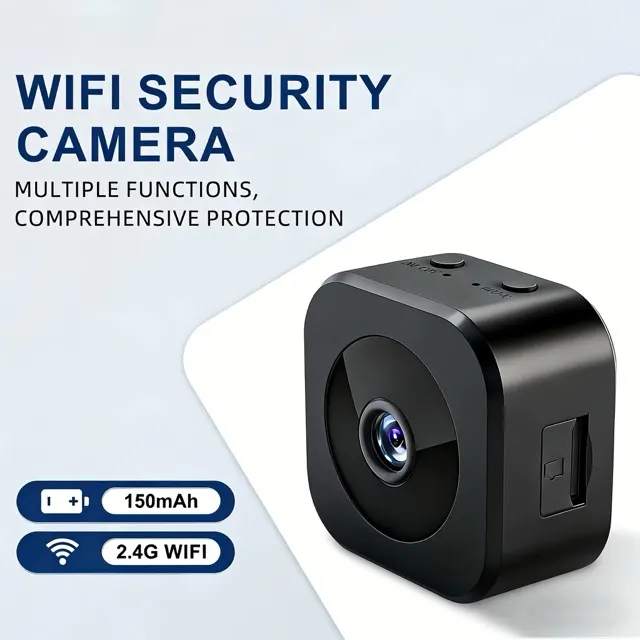
A Wi-Fi camera that costs about 800 rubles, roughly ten dollars, now runs without any Chinese cloud account. The person who did it mostly just chatted with Claude while the AI reflashed the device by itself.
The camera has a magnetic mount, a built-in battery and USB power. The catch: it only works through the maker's own app, which wants an account on a server in China. The owner, who wanted video surveillance for his plot of land, disliked both the privacy angle and the ugly interface, so he took the camera apart.
Inside was a BK7252N chip, a 32-bit ARM microcontroller at 160 MHz with 544 KB of memory and built-in Wi-Fi. The sensor is a GalaxyCore GC0329, 0.3 megapixels at 648×488, although the store listing proudly said HD. Two pads marked RX and TX gave access to a console running the RT-Thread operating system. The SDK for Beken chips isn't public, so that route was closed. The open-source OpenBeken project, built on FreeRTOS, supports similar cameras but not this chip or sensor.
How Claude got the camera working
Claude got access to a project folder with the OpenBeken sources and one task: make the camera work. It found a UART download tool, dumped the original firmware, built OpenBeken for the similar BK7231N chip and flashed it. The logs showed the chip booted but the camera sensor failed to start. The clock registers for the camera's parallel port sit at different addresses on the BK7231N, so Claude pulled the right ones from the original firmware. Still no picture. The sensor has 259 control registers that need correct values, and those also came from the original firmware.
Reflashing meant power-cycling the camera every time. The author wired a relay module to an Arduino from his desk drawer, and Claude toggled the power and flashed new builds on its own.
How to use the firmware
After a few hours there was a patch for OpenBeken with support for this camera, plus motion detection that saves photos to an SD card. The camera opens an unprotected access point. Connect, open 192.168.4.1 in a browser, and set your home network in Config → Configure WiFi. Then the camera appears on the local network at http://name.local, with the name set in the web interface.
The patch and build instructions are on GitHub. No cloud, no registration. Android and iOS apps are planned, and the author has more gadgets waiting for the same treatment.
Apps worth a look
SUMO: the number puzzleTap the right tiles, add them up, hit the target. Easy to learn, hard to master. Free, for all ages.
Dialo: learn languages by speakingTalk to an AI conversation partner; every sentence comes back corrected and explained in your language. 9 languages, A1 to C2.
ediviewer: read EDI files like documentsOpen EDIFACT and X12 messages, see every segment explained, convert to JSON/XML, export PDF and Excel. Runs locally, no upload.
giftdetect: the right gift in minutesPick who it is for, the occasion and their personality. The search engine reads product descriptions from local shops and ranks what fits. Free, no sign-up.
More from this day
See all →


More in: Hardware
See all →
Camp Snap CS-8 Micro camcorder is 3 inches long and clips to keys
Ring Drone Cam: Amazon's $250 Indoor Flying Camera Is Loud

Robot dog walks a real dog in San Francisco, video shows