Google's Ammaar Reshi put Windows 11 on an iPhone Duo to work
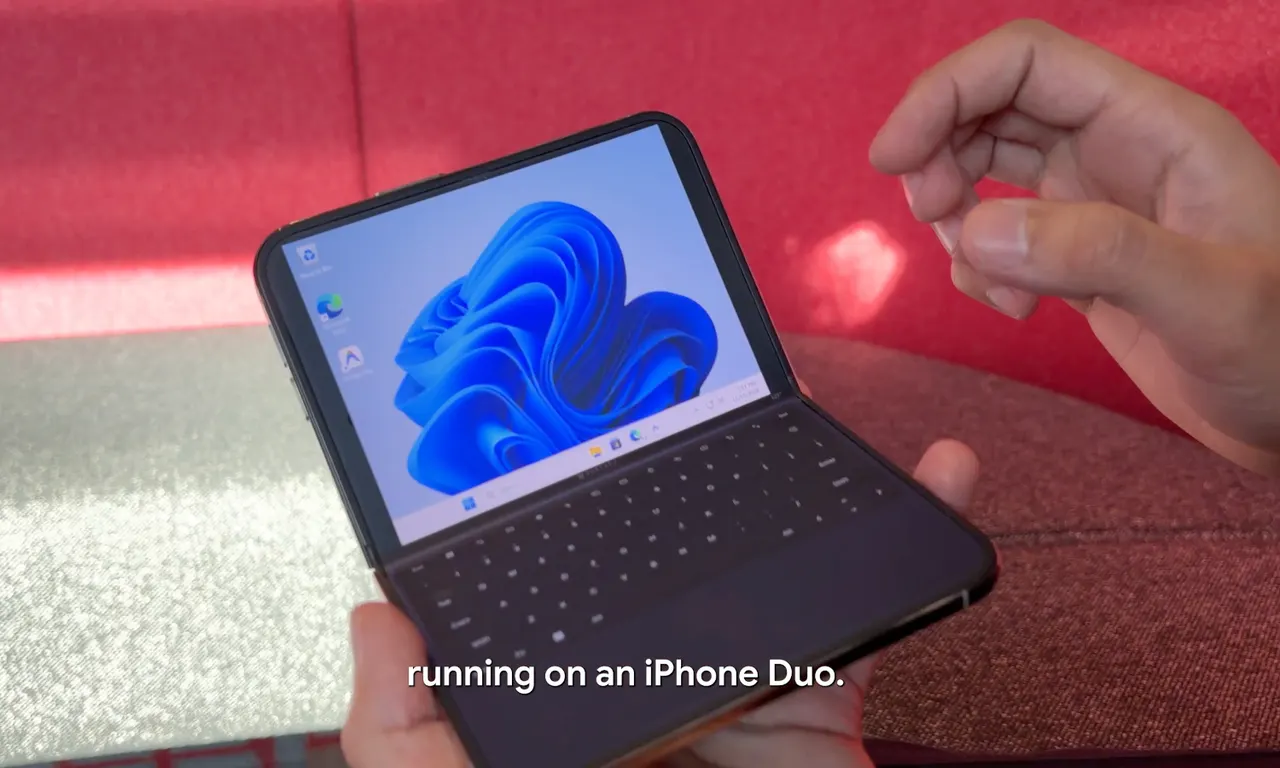
A Google AI Studio executive turned an iPhone Duo into a pocket Windows 11 laptop, with half the screen acting as a keyboard. The point was to get work done.
 SUMO· the number puzzle
 Dialo· learn languages by speaking
 ediviewer· read EDI files like documents
 giftdetect· the right gift in minutes
Windows 11 on an iPhone Duo sounds like a prank aimed at every tech fan at once. It isn't. Ammaar Reshi, who leads product and design at Google AI Studio, did it because he wanted a tiny laptop to work on.
The result is a foldable that behaves like a pocket-sized UMPC, the term for an ultra-mobile PC. Opened up, one half of the screen is the display and the other half is a keyboard, and a rather good-looking one. The whole thing resembles a very small laptop. Reshi runs his AI agents on it and handles simple tasks that Windows 11 can manage on such a small machine.
There is a neat bit of circularity here. He used AI to modify both Windows 11 and the iPhone Duo so the system would run at all. Apparently he woke up wanting a pocket laptop with Windows, found none on the market, and rebuilt a finished product into one.
How did he get Windows 11 running on the iPhone Duo?
The source material does not spell out the technical steps, only that AI did the modifying. What it does say is that Reshi shares instructions on his X account, so anyone curious can try to repeat it.
Why not Android, or a Pixel Fold?
The obvious objections are all there. Apple fans may wince that iOS was passed over, Google fans may ask why he didn't use a Pixel Fold and Android, and Windows fans are already tired of Microsoft's stumbles. None of that was the motive. Reshi wanted a device he could actually work on.
It is also a small argument about what AI is for. Instead of more generated images, videos or bland text, here it was used to build something odd and useful: a laptop that fits in a pocket.
Apps worth a look
SUMO: the number puzzleTap the right tiles, add them up, hit the target. Easy to learn, hard to master. Free, for all ages.
Dialo: learn languages by speakingTalk to an AI conversation partner; every sentence comes back corrected and explained in your language. 9 languages, A1 to C2.
ediviewer: read EDI files like documentsOpen EDIFACT and X12 messages, see every segment explained, convert to JSON/XML, export PDF and Excel. Runs locally, no upload.
giftdetect: the right gift in minutesPick who it is for, the occasion and their personality. The search engine reads product descriptions from local shops and ranks what fits. Free, no sign-up.
More from this day
See all →
Coral Hart used AI to write 370 books in 20 months

WhatsApp Zaps: self-deleting photos and videos for any chat

Green SM taxis: Karnataka halts new registrations, eyes mandatory meters