Instagram on iPhone Duo: Mosseri admits the layout is a problem
Instagram's boss says fitting the app to the foldable iPhone Duo is hard, and Reels buttons now sit right on top of the navigation buttons.
 SUMO· the number puzzle
 Dialo· learn languages by speaking
 ediviewer· read EDI files like documents
 giftdetect· the right gift in minutes
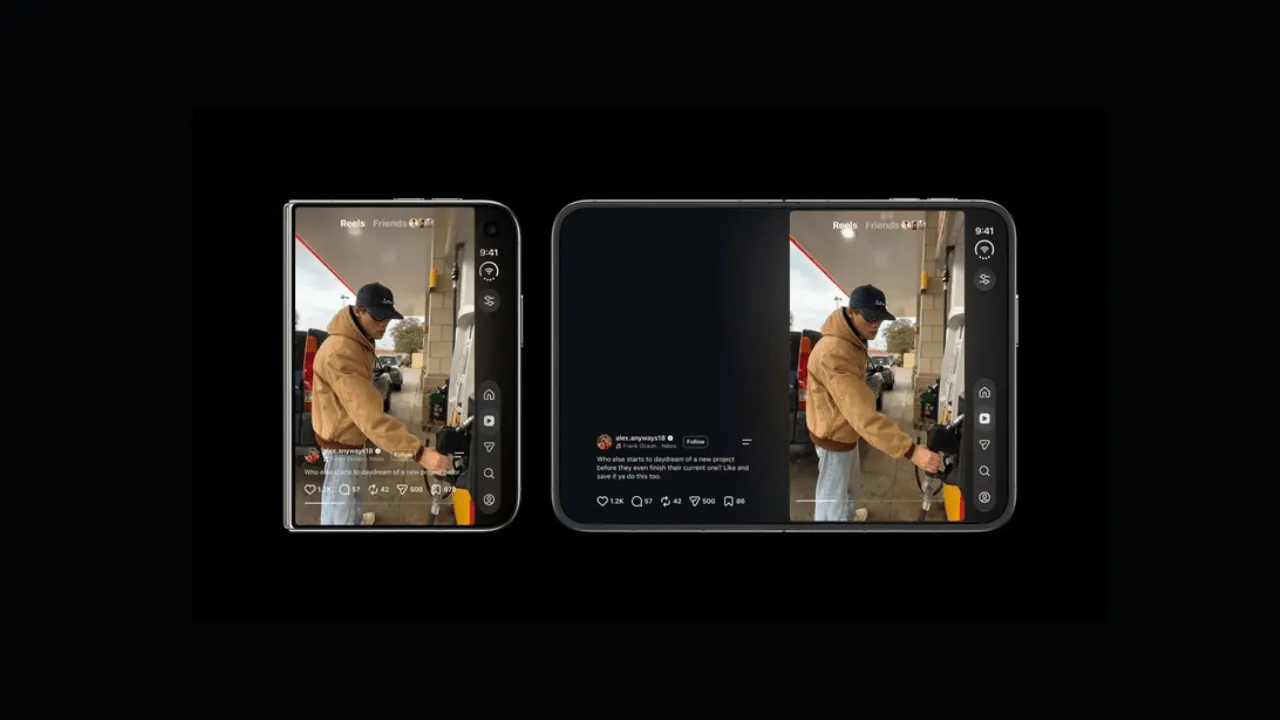
Instagram on the iPhone Duo has a button problem, and the man in charge of the app says so himself. Adam Mosseri, Instagram's CEO, said on Threads that adapting the app to the foldable phone is going to be difficult, and that the interface will be reworked.
The app launched worldwide on 23 October. Since then, users have criticised the interface design and where the buttons sit. Mosseri's comments suggest Instagram is listening, and that newer versions may rearrange things.
Why is Instagram hard to adapt to the iPhone Duo?
According to Mosseri, Instagram was built for long, tall screens. The iPhone Duo is different. Even folded, it offers a wider and shorter display than a typical smartphone. That means some elements of the interface have to move.
He gave a concrete example. With the phone folded, the navigation buttons sit on the right side of the screen, which he called ergonomically sensible. But the Like, Comment and Share buttons in Reels are on the same side. The result is two stacks of buttons piled on top of each other. Mosseri said that layout is not good and needs another look.
What about Reels on the unfolded screen?
One user told Mosseri that using Instagram in portrait mode with the large screen open gives a better experience. Mosseri agreed that this is the best way to watch Reels. He added that the company is also working on improving the experience in the other screen orientations.
The source gives no release date for a redesign, so there is nothing to say yet about when the fix will arrive. For now, if you own an iPhone Duo and Reels feels cramped, holding the phone upright with the big screen open is, by Mosseri's own account, the better option.
Apps worth a look
SUMO: the number puzzleTap the right tiles, add them up, hit the target. Easy to learn, hard to master. Free, for all ages.
Dialo: learn languages by speakingTalk to an AI conversation partner; every sentence comes back corrected and explained in your language. 9 languages, A1 to C2.
ediviewer: read EDI files like documentsOpen EDIFACT and X12 messages, see every segment explained, convert to JSON/XML, export PDF and Excel. Runs locally, no upload.
giftdetect: the right gift in minutesPick who it is for, the occasion and their personality. The search engine reads product descriptions from local shops and ranks what fits. Free, no sign-up.
More from this day
See all →
Android 17 Pixel update bugs: black camera screen and more

Wally Finder: an artist's AI hunts Waldo on 450 public cameras
BugMeNot has shut down without warning and left a puzzle